

Monday, September 14th 2026
How to evaluate a Shopify mobile app platform
To evaluate a Shopify mobile app platform, test your catalog and integrations on real phones, record what happens, and ask who fixes failures after launch. A demo is a useful introduction. It cannot tell you how the app handles a second search, a failed discount code, or a return to a collection you were browsing.
Start with the shopping journeys your customers repeat. Then check the provider's architecture and maintenance commitments against what you observed. You need both a usable app today and a team responsible for keeping it usable.
If you are still choosing between a builder, a wrapper, and a custom project, start with how to turn a Shopify store into a mobile app. This guide helps you test the platforms on your shortlist.
What should you ask about how each screen is rendered?
Ask what renders each shopping screen, including custom components and integrations. A provider's answer should distinguish platform-native UI, React Native, and embedded web content.
React Native can render platform UI components while sharing code across iOS and Android. A webview renders web content inside an app. An app can combine approaches, so one label may not describe its search, loyalty page, product configurator, and checkout.
A slow screen does not identify the technology behind it. Images, network requests, caching, and implementation choices can affect any app. The five-minute webview check offers observations to investigate; confirm the implementation with the provider before assigning a cause.
Request a screen-by-screen explanation for the parts you will use. Record whether each integration uses the provider's standard implementation or requires custom work. Test that configuration, since a stock demo may not include your search, subscriptions, or loyalty setup.
How does Shopify build its own Shop app?
Shopify runs a consumer shopping app of its own, Shop, and it publishes how that app is built. In September 2026, Shopify explained its return from React Native to Swift and Kotlin. Coding agents had reduced the cost of maintaining separate platform implementations. Shopify also said React Native had served it well and its React Native apps were fast.
Shop used SwiftUI on iOS and Jetpack Compose on Android for its rebuild. Shopify reported cold-start time reductions of 23% on iOS and 50% on Android. It measured from tapping the app icon until the initial home-feed content appeared.
That write-up now turns up in vendor conversations, usually as proof that one architecture wins. It does not settle that question for your store. Those results belong to Shop, and Shopify simplified the app during the migration, so the comparison does not isolate the effect of changing frameworks. The report does not provide a measurement date range or full benchmark protocol. It does not establish a conversion lift or a performance target for your store.
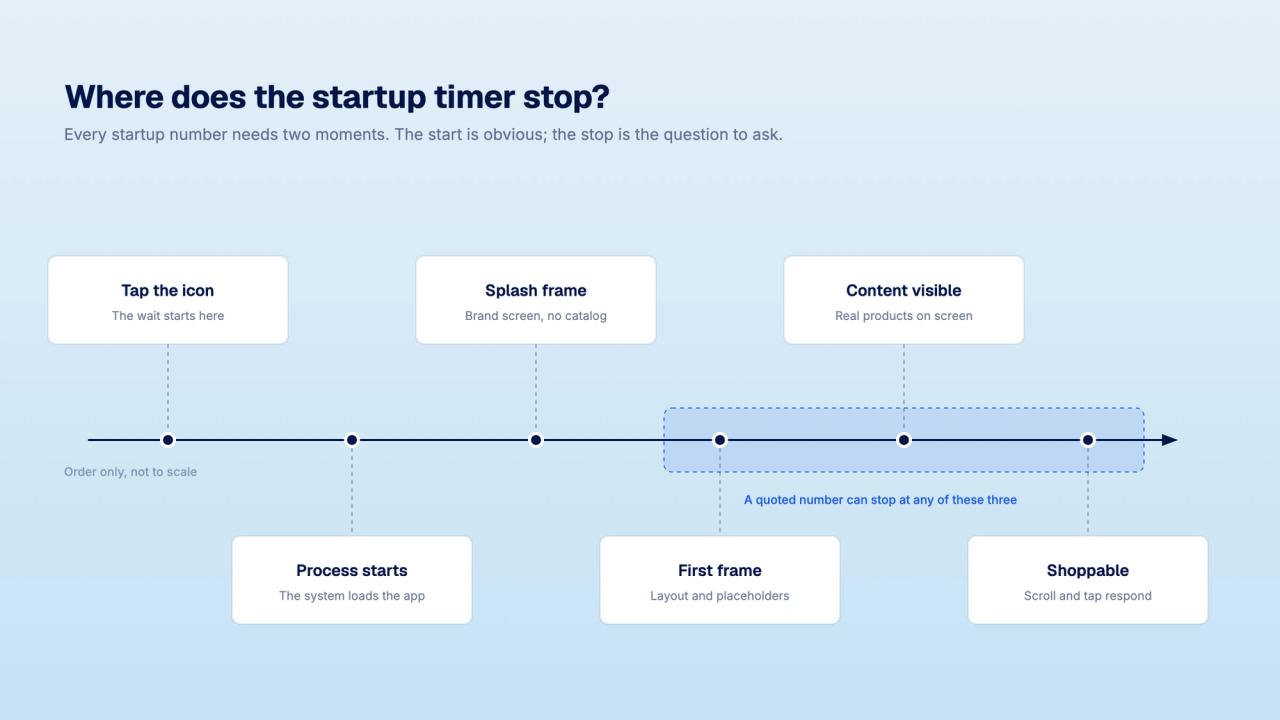
What the report is good for is sharpening your questions:
| Ask the provider | Evidence to request |
|---|---|
| When does your startup timer stop? | A recording that shows when shopping content appears, not just the splash screen |
| How do you measure stability? | The definition of a crashed session, measurement window, app versions, and separate iOS and Android results |
| Who maintains platform and dependency updates? | A named owner, supported OS versions, and the process for testing and releasing updates |
| How do you keep iOS and Android consistent? | Checks covering the same shopping flows and integrations on both platforms, with any differences documented |
These questions apply to every architecture. Faster development still leaves someone responsible for testing and maintenance.
Which six shopping failures should you test for?
Run the same actions on every shortlisted platform. These are test scenarios, not claims that a particular provider has these defects. A failure tells you what needs fixing; it does not prove a cause or quantify lost sales.
| Shopper action | Failure to look for | Acceptable behavior |
|---|---|---|
| Search one term, then a second | Products from the first query appear as results for the second | Results match the active query; any loading state is clear |
| Scroll through a dense collection and back | Previously viewed images repeatedly disappear or reload | Browsing remains responsive and viewed content stays available where practical |
| Enter an invalid discount code | The error prevents correction or blocks unrelated controls | The customer can understand the error, edit the code, and continue |
| Quick-add a product without variants | A small cart-badge change is the only confirmation | Visible and accessible feedback confirms the product and quantity added |
| Open a filter sheet or menu | Controls behind a modal remain active, or closing it loses the selection | Focus and interaction follow the intended layer; selections persist |
| Open a product, then return to its collection | The app loses the filter, sort order, or scroll position | The customer returns to the same browsing context |
Search twice before judging search
Use unrelated terms, then change the filter or sort order. Test the search integration you intend to buy, not only the platform's default search. Check the query field and results together. A previous response arriving late should not replace the results for the current query.
Distinguish initial loading from repeated loading
A first visit may need to fetch images and product data. Repeat the route after that initial load. Watch for content that reloads unnecessarily on the return trip, and record the difference. Do not compare one provider's cached result with another's first load.
Check recovery as carefully as success
Try an invalid code, an unavailable variant, and a failed login. The useful question is whether the customer can correct the problem and continue without losing work. An error can require action before checkout proceeds; it should still explain what to do.
Confirm what reached the cart
Add a product and inspect the cart. Check the variant, quantity, and confirmation, including with the phone's screen reader. A visual animation alone does not show that an assistive-technology user received the same information.
Test overlays as controls
Open and close menus, filters, and modal sheets. Check what remains interactive and where focus goes when the overlay closes. Visible navigation behind a sheet is not automatically a defect. Judge whether the controls behave as intended and preserve the shopper's choices.
Return to a collection with work already done
Apply a filter, change the sort order, scroll, and open a product. Return using the app's navigation and the Android back action where applicable. Check which choices survive. If data must refresh, the app should explain unavailable products without needlessly discarding the browsing context.
How do you run a comparison you can reproduce?
Use the same catalog, account state, integrations, and device for each provider comparison. Include an older iPhone and a mid-range Android phone that reflect your audience. Agree on pass criteria before the demo so a polished presentation cannot change what you are evaluating.
- Record the setup. Note the device, OS, app version, date, network, account state, and enabled integrations. Record whether content was already cached.
- Measure startup separately. Start with the app process closed, then compare reopening an already running app. Use the same start and end points for each provider. Record when initial shopping content appears and when it responds to input.
- Run the six shopping tests. Repeat each route under the same conditions. Keep timings and recordings for every attempt, including failures. Label this as a small evaluation sample, not a general benchmark.
- Open a product from a push notification. Check the destination, login, and cart, both with the app closed and already open. Test a product that becomes unavailable so the fallback gets tested too.
- Complete a test checkout. Use an agreed test order or test environment. Verify the product, discount, shipping options, payment handoff, and order confirmation with the provider.
- Retest on the other platform and network. Repeat on iOS and Android, then change between Wi-Fi and cellular. Compare providers within each condition rather than mixing results from different phones or connections.
A short trial can reveal crashes, but a crash-free trial cannot establish production stability. Ask for release-level evidence with a defined time window and session count. Keep the provider's production figures separate from your own observations.
What should you record while testing?
Record each issue while testing. A useful result names the action, expected behavior, actual behavior, and conditions needed to reproduce it.
| Field | What to record |
|---|---|
| Test and setup | Journey, device, OS, app build, integration, network, and account state |
| Expected result | The behavior you agreed would pass |
| Actual result | What happened, timing if relevant, and a private recording reference |
| Repetition | Attempts and failures; include successful runs too |
| Business priority | Blocks purchase, loses customer work, or causes a smaller usability issue |
| Resolution | Owner, proposed fix, included or extra cost, target date, and retest result |
Keep unresolved issues visible. A roadmap promise does not pass the test. If a critical integration requires custom work, request a working version before treating it as available for launch.
Before signing, distinguish responsibilities held by your team, the platform, and integration vendors. Ask who investigates a failure that crosses those boundaries, who approves a release, and what recovery process exists if an update breaks shopping.
Compare the cost of that work with the return you model before you build. For an existing app, also work through what switching platforms involves. A provider comparison is incomplete without ownership, migration, and ongoing maintenance costs. If you want a native build in that comparison, see how NAPPS works.
Can a usability test tell you the revenue impact?
A browsing test can show that customers lose their place or cannot correct a discount code. It cannot tell you how much revenue fixing that issue will add.
App users choose to install and may already be a brand's more engaged customers. An app-versus-website revenue comparison therefore does not isolate the app's effect. For incremental revenue claims, ask for a holdout test or a carefully designed matched-cohort analysis, with the measurement window and limitations stated. Prefer independent research for category benchmarks and attribute engineering reports to the app actually measured.
Use your test results to decide whether a platform meets your requirements. Use separate evidence to model its commercial return.
Frequently asked questions
No. React Native can render platform UI components. A webview displays web content inside an app. Ask which approach each shopping screen and custom integration uses, then test the proposed implementation.
No. They describe Shopify's rebuild of Shop under its reported comparison conditions. Set criteria for your catalog and customer devices. Use consistent timing boundaries and record the setup so comparisons between your shortlisted providers are meaningful.
Ask it to reproduce the issue with that integration enabled and identify who owns the fix. Record any extra cost, delivery date, and retest requirement. Your customers will experience the combined app, so an unresolved integration failure remains part of your evaluation.
An unresolved issue that prevents purchase, loses important customer work, or leaves a required integration untested should block acceptance. Agree on the remaining issues and their owners before signing. A promised fix needs a retest.
How do you choose a Shopify app platform after testing?
Choose a platform whose tested shopping journeys meet your requirements and whose team accepts responsibility for keeping them working. Keep the evidence sheet for launch testing and future releases. It gives both teams a clear record of what the app must do.
NAPPS, a native mobile app builder for Shopify and Shopify Plus brands, builds with SwiftUI on iOS and Jetpack Compose on Android. The app is free until publication, so you can evaluate it with your catalog before committing to launch. Apply the same tests and evidence requests to NAPPS as to every other provider.
Put NAPPS through the same evaluation
NAPPS builds with SwiftUI on iOS and Jetpack Compose on Android, and the app is free until publication. Test your catalog, your integrations, and your own shopping journeys before you commit to a launch.
Book a 20-minute callKeep reading
October 27, 2026 - 10 min read
4 MobiLoud alternatives for Shopify: pricing and fit


October 23, 2026 - 8 min read
Tapcart vs Shopney: pricing, features, and which fits your Shopify store
September 18, 2026 - 13 min read
Tapcart Alternative: NAPPS Pricing, Features & Migration