

Tuesday, September 1st 2026
How to turn a Shopify store into a mobile app (2026)
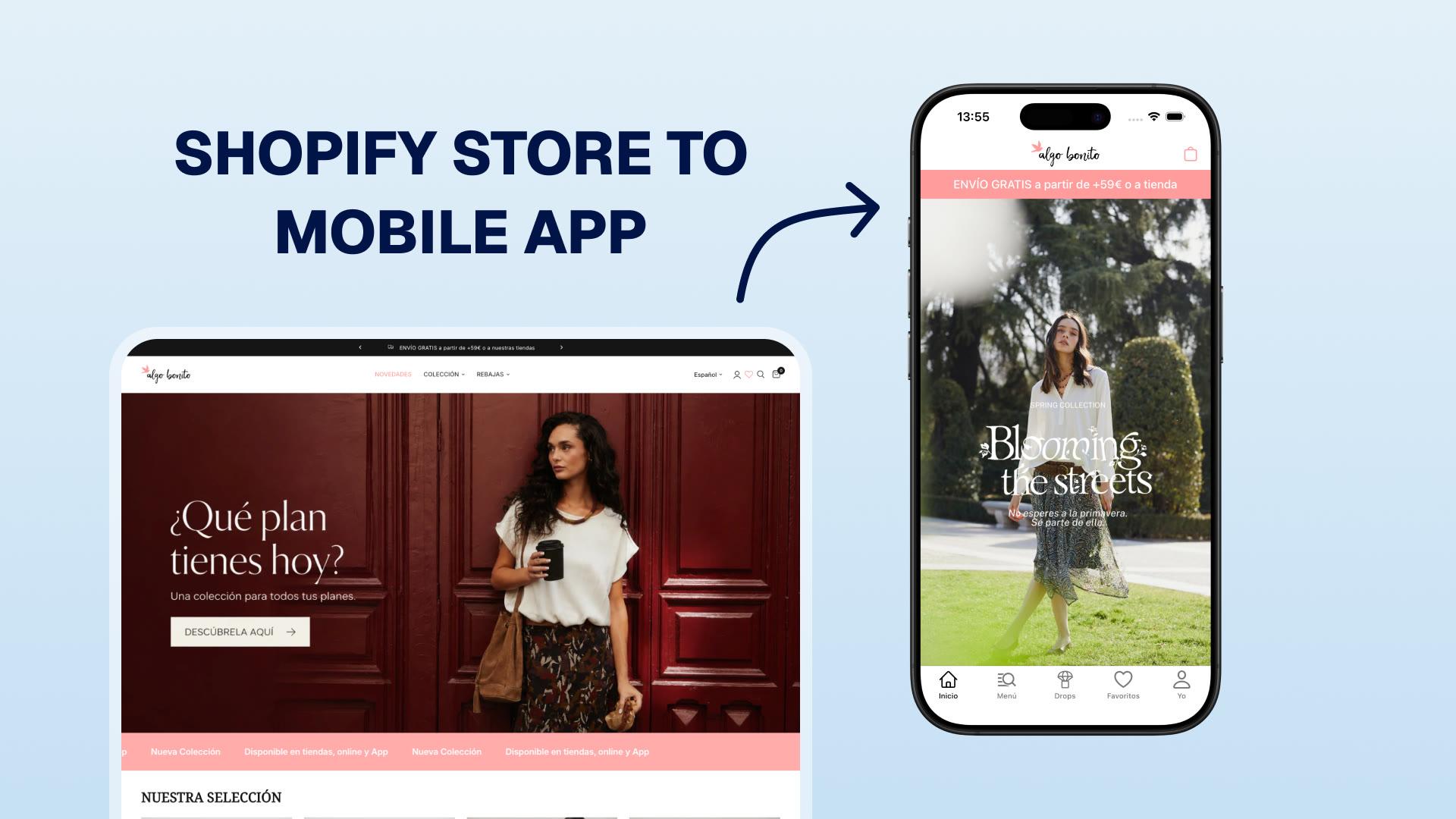

To turn a Shopify store into a mobile app, choose one of four routes: a native app builder, a webview wrapper, a custom build, or a progressive web app. For most established Shopify brands, a native builder is the sensible middle ground. Shopify stays the source of truth, and the app reaches iOS and Android without a software project.
Your Shopify store remains the commerce system. Products, inventory, prices, customers, and Shopify checkout stay connected to it. The app changes how customers browse, return, and buy on their phones.
What a Shopify mobile app is
A Shopify mobile app is a downloadable iOS and Android app connected to a Shopify store. It sells the existing catalog and shares products, inventory, pricing, customer data, and checkout with the online store. Shopify's current mobile-commerce documentation describes the same building blocks: the Storefront API for products, search, and carts, plus Checkout Kit to present Shopify checkout inside the app (Shopify mobile commerce documentation).
Mobile web is where anonymous visitors arrive. The app is where known customers come back. An installed, opted-in app gives you a direct route back to people who already chose you.
Our view. Mobile web is built for transactions. Apps are built for repeat relationships.
That is a lens, not a law. Modern web stores can keep customers logged in, save carts, run loyalty, and send web push when a site is added to the iPhone Home Screen. An app can make these actions more consistent and remove steps.
The best way to turn a Shopify store into a mobile app
There is no single best route. The right answer depends on whether the priority is speed, a genuinely native shopping experience, or complete engineering control.
| Route | Best fit | What you keep | What you take on |
|---|---|---|---|
| Native app builder | An established brand that needs a native iOS and Android app without owning a development team | Shopify catalog, inventory, customers, and checkout stay connected | You work within the platform's product model and extension options |
| Webview wrapper | A brand that needs an app-store presence quickly and accepts a website-based experience | The existing theme and much of its behavior | The app inherits the site's loading, navigation, and browser constraints |
| Custom build | A brand with unusual product logic, device features, or an in-house product team | Full control over the app UI and integration design | Engineering, QA, store submissions, API upgrades, and ongoing maintenance |
| Progressive web app | A brand that needs an installable web experience but does not need App Store distribution | The web stack and search discoverability | No native app-store listing, and a narrower set of platform capabilities |
For most Shopify brands, start with a native app builder. It is the route that gives a team a usable commerce app and retention tools without requiring the brand to become a mobile-software company. Choose a wrapper only when speed and web reuse matter more than the experience. Build custom when the shopping journey itself is the product advantage.
Mobile web vs. a mobile app: what actually changes
Mobile web can make every return visit feel like a new session. You acquire a customer, send them to a mobile site, and may have to pay to reach them again later. An app does not do anything mobile web cannot do. It can make four things more reliable:
- Owned reach. App push notifications land on the lock screen and reach customers you may have no email or phone number for. Web push exists too (including for sites added to the iPhone Home Screen), but app push generally sees higher opt-in, richer formatting, and more consistent delivery. It's also free to send, delivered through the platforms' own infrastructure (Firebase Cloud Messaging, Apple Push Notification service) with no per-message cost like SMS.
- A durable installed presence. A web store can hold a login and cart through the browser, but an installed app persists on the home screen between visits, so returning takes one tap rather than a search or a saved link.
- A lower-friction experience. A well-built native app can reduce loading and navigation friction versus a browser, which tends to mean more products viewed per session.
- Less reacquisition spend. When customers have your app installed, you can reach them directly instead of renting their attention back through Meta, email, and SMS on repeat.
How the app connects to Shopify
A well-built app does not copy Shopify data into a separate store. It reads the catalog, search, carts, and customer data from Shopify, then passes the customer into Shopify checkout. Shopify's own architecture separates the app UI, the Storefront API, and Checkout Kit. The payment and order still run through Shopify (Shopify's mobile storefront guide).
The important distinction is native vs. webview. A native app renders shopping screens with the device's app UI. A webview renders a website inside an app shell. Both can use Shopify, but they do not give the customer the same experience. Test the app you are considering with our five-minute webview check.
Apple does not ban webviews. It does require an App Store app to provide features, content, and UI beyond a repackaged website, which should shape how a brand evaluates any wrapper route (Apple App Review Guideline 4.2).
Build vs. buy is the other decision. A custom or agency build gives a brand full control, but it also creates a mobile product that the brand must maintain. A native builder gets the core shopping experience live faster and leaves the team to focus on launches, merchandising, push, and retention. For an example of a platform handling bespoke product logic, see how Planeta Huerto rebuilt six native product-page components.
What Shopify's move back to native means for your choice
Shopify's own Shop app offers a useful example of the tradeoffs behind the native label. In September 2026, Shopify explained its move from React Native to Swift and Kotlin. Coding agents had reduced the cost of maintaining separate iOS and Android implementations. Shopify also said React Native had served it well and its React Native apps were fast.
For Shop, the rebuild used SwiftUI on iOS and Jetpack Compose on Android. Shopify reported cold-start time reductions of 23% on iOS and 50% on Android, measured from tapping the app icon until the initial home-feed content appeared. Those are results from Shop's rebuild. Shopify also simplified the app during the migration, so the comparison does not isolate the effect of changing frameworks or establish a conversion lift.
React Native and a webview wrapper are different approaches. React Native can render platform UI components while sharing code across platforms; a webview renders web content inside an app. Ask a provider what renders your shopping screens, including custom components, rather than relying on the word "native."
Before choosing, test the app with your catalog on an older iPhone and a mid-range Android phone. Check startup, scrolling, returning to a collection, and opening a product from a push notification. Ask who maintains platform updates and keeps features consistent across iOS and Android. Shopify's decision makes those questions timely; the answers should determine which route fits your brand.
What a Shopify mobile app actually does for a brand
A mobile app earns its place by making retention mechanics easier to run. Four matter most.
Push notifications. Push reaches the lock screen, has no inbox competition, costs nothing per message, and can open a specific product in one tap. It is also underused at many brands. Learn how to run it in our complete guide to push notifications for Shopify.
App-exclusive campaigns. When a product, a price, or early access exists only in the app, downloading becomes a value decision instead of an effort decision. A single app-exclusive campaign gave one NAPPS customer the highest online sales day in the brand's history, beating Black Friday and Christmas, reaching only opted-in customers from one channel.
Visible loyalty. Loyalty programs are easy to ignore when they sit behind a login. In an app, points can appear while customers browse and rewards can be redeemed in the cart. That makes the balance easier to use.
A faster path to checkout. Persistent login and a saved cart mean the customer is often one tap from buying, which is one reason app users tend to convert at higher rates than mobile web (though app users are also a self-selected, more engaged group).
Push, exclusives, and loyalty aren't separate tactics. They're three engines of one growth loop, which we break down step by step in the guide to growing a Shopify mobile app /blog/shopify-mobile-app-growth-guide.
Who should launch a Shopify mobile app?
A mobile app suits brands with an audience worth retaining. It is less useful for brands still building the audience that would make the channel viable. It deepens existing relationships. It does not create demand from strangers.
The clearest signals that the timing is right:
| Signal | Why it matters |
|---|---|
| Repeat purchase rate above ~20% (starting heuristic) | Around here the economics of push, loyalty, and in-app campaigns tend to start working |
| High mobile traffic, weak mobile conversion | A gap an app can help close |
| Rising email and SMS costs, flattening returns | Push adds an owned channel that's free to send |
| Paid acquisition working, repeat spend under pressure | Apps aim to raise repeat spend rather than lower acquisition cost |
| Seasonal or community-driven brand | A reason to stay in contact between purchase occasions |
Revenue is a proxy, not the deciding factor. As a rough starting heuristic, the economics for a traditional ecommerce brand tend to start working around $800k to $1M in annual revenue because below that the customer base is often too small to fund and feed the channel. Brands with subscription-style purchasing or a strong community can benefit at a smaller size. If you are still deciding whether the channel fits your store, see how NAPPS works.
What launching and growing one actually involves
Launching the app is only part of the job. The work splits into three phases.
- Prepare the launch. Treat the App Store listing like a landing page. Add a smart banner, QR code, and deep links to the website. Prepare segmented announcement emails and one clear install incentive. The complete Shopify mobile app launch checklist works through this step in detail. NAPPS includes the launch tooling brands need to run this work (see how it works).
- Run the first 90 days as a loop. Acquire installs from the audience you already own, activate the first in-app purchase quickly, and switch on the retention engine from week one, not month six. We map the whole first quarter, week by week, in what to expect in your first 90 days /blog/first-90-days-shopify-mobile-app.
- Pick the right install incentive. A first-install discount, a loyalty point multiplier, and free shipping all work, but the play gaining the most ground is store credit: a balance the customer feels they already own, that can only be spent with you, and that makes a return visit much more likely. Brands run it as a welcome deposit on first login, as extra credit back on app purchases, or as refunds paid out as boosted credit.
Measure and govern the channel. After launch, separate App Store discovery and install signals from the revenue and retention measures in Shopify. Start with App Store Connect Analytics for the iOS side, and the mobile app metrics guide for the commerce side. Before collecting optional analytics or marketing permissions, make the controls and disclosures clear to customers and keep your privacy policy current. Our guide to privacy and consent for e-commerce mobile apps covers what that involves.
App growth starts with converting customers you already have, not strangers finding you in the App Store. Net-new installs are a bonus.
What the numbers look like
Across NAPPS customers, app users consistently show higher order values and repeat rates than the same brand's online-storefront customers. One important caveat up front: app users are self-selected, and often already among a brand's more loyal customers, so the figures below are observed differences among app users, not an isolated causal lift. Establishing true incremental lift needs a matched cohort or a holdout test, which these numbers aren't.
| Metric (app vs. same brand's storefront) | Observed among NAPPS customers |
|---|---|
| Average order value | +5% to +38% higher |
| Amount spent per customer | +23% to +77% higher, ~47% typical |
| Purchase conversion rate | ~5x to 6x the website, about 4.7x mobile web |
| Repeat purchase rate (app users) | 44.2% to 78%, depending on category and definition |
| App share of online revenue | 15% to 45% within the first months |
Source: NAPPS customer data, app channel vs. online storefront. Ranges vary by category and by how actively each brand runs push, exclusives, and loyalty. App users are self-selected, so the figures are observed differences, not isolated causal lift.
A few of the brands behind those ranges:
| Brand | Category | Headline result |
|---|---|---|
| Zippy | Children's fashion | ~34% of online revenue through the app; 21% push open rate; 7.20% app conversion vs. 1.53% on mobile web; combined digital revenue +15% YoY, Jul 2025–Feb 2026 |
| Planeta Huerto | Organic food | +47% spend per customer, 72% repeat purchase rate (after migrating off a webview app) |
| Farma2Go | Online pharmacy | +38% average order value and +77% amount spent per customer in the last 90 days, the highest-spending channel in the business |
| Missus | Swimwear | Five years post-launch, the app still accounts for ~30% of online revenue. App customers spend +47% more and return at 44.20% versus 33.63% on the storefront, trailing 365 days as of Jul 2026 |
The +47% and +77% figures are top performers, not the average. Treat the table as evidence of what customers observed, not a forecast. A serious business case still needs a matched cohort or holdout test.
Shopify mobile apps with NAPPS
NAPPS, a native mobile app builder for Shopify and Shopify Plus brands, builds with SwiftUI on iOS and Jetpack Compose on Android. The Shopify store stays the source of truth. NAPPS includes the tools needed to run the growth loop.
That means the acquisition tooling is built in (App Store listing setup, smart app banner, desktop QR codes, and deep linking with install tracking), push is unlimited and free to send on every plan, app-exclusive campaigns run through Campaign Launcher, and loyalty surfaces in the shopping flow through Growave, LoyaltyLion, or Smile. Direct integrations with Klaviyo (all plans) or Ometria (Enterprise) let push, email, and SMS coordinate instead of competing.
Plans run from $299/month for Business to $999/month for Enterprise, which includes custom development. The app is free until publication and has no setup fee. If you switch from another provider, NAPPS matches the remaining time on your current contract.
Frequently asked questions
Use a native app builder, a webview wrapper, a custom build, or a progressive web app. A native builder is usually the best fit for an established Shopify brand that wants App Store distribution, native shopping screens, push notifications, and a Shopify-connected app without hiring a mobile team. A wrapper is faster when reusing the existing website matters more than the native experience. Build custom when the customer journey itself needs to be bespoke.
Yes. A no-code native app builder connects to the Shopify store and lets a commerce or marketing team configure the app's pages, navigation, campaigns, and launch assets. You still need to prepare the store accounts, listings, privacy details, and release testing. You do not need to maintain an in-house iOS and Android codebase.
The cost depends on the route. A builder is a recurring platform cost. A custom app is an engineering project with ongoing maintenance, release, and API-upgrade work. Compare the subscription or project fee, any setup or migration cost, your Apple and Google developer accounts, and the time the team will spend running the channel. NAPPS plans run from $299 to $999 per month. The app is free until publication, with no setup fee.
A native app renders shopping screens with app UI components. A webview app wraps the website in an app shell and renders those screens in a browser frame. Both can connect to Shopify. The practical test is whether the product browsing, navigation, cart, and state management feel and behave like an app or like the mobile site. Use this five-minute check before you choose.
Based on NAPPS customer data, app customers show +5% to +38% higher average order value and +23% to +77% higher amount spent per customer than the same brand's online-storefront customers. Among active customers using push, loyalty, and app content, 15–45% of online revenue shifts to the app in the first months. App users are self-selected, so these are observed differences rather than guaranteed lift. Isolating true incremental revenue needs a holdout or matched-cohort test.
The available evidence is reassuring but not conclusive. Zippy's app grew to roughly 34% of online revenue while the brand's combined digital revenue grew 15% year over year, which is consistent with the app adding growth rather than just shifting it. That single case doesn't isolate causality (other factors can drive year-over-year growth), so treat it as encouraging directional evidence, not proof.
The bottom line
A Shopify mobile app is a retention channel, not a second storefront. Its results depend on how it is built, the incentive and onboarding that drive the first purchase, and the retention program that follows. A webview app left untouched after launch will rarely do much for the business.
See what a Shopify mobile app could look like for your store
We'll map your traffic, repeat purchase rate, and customer base into a realistic launch plan before you commit.
Book a 20-minute callKeep reading
October 27, 2026 - 10 min read
4 MobiLoud alternatives for Shopify: pricing and fit


October 23, 2026 - 8 min read
Tapcart vs Shopney: pricing, features, and which fits your Shopify store
September 18, 2026 - 13 min read
Tapcart Alternative: NAPPS Pricing, Features & Migration