

Saturday, September 5th 2026
Privacy and consent for e-commerce mobile apps: GDPR, CCPA, tracking, push, and customer choice
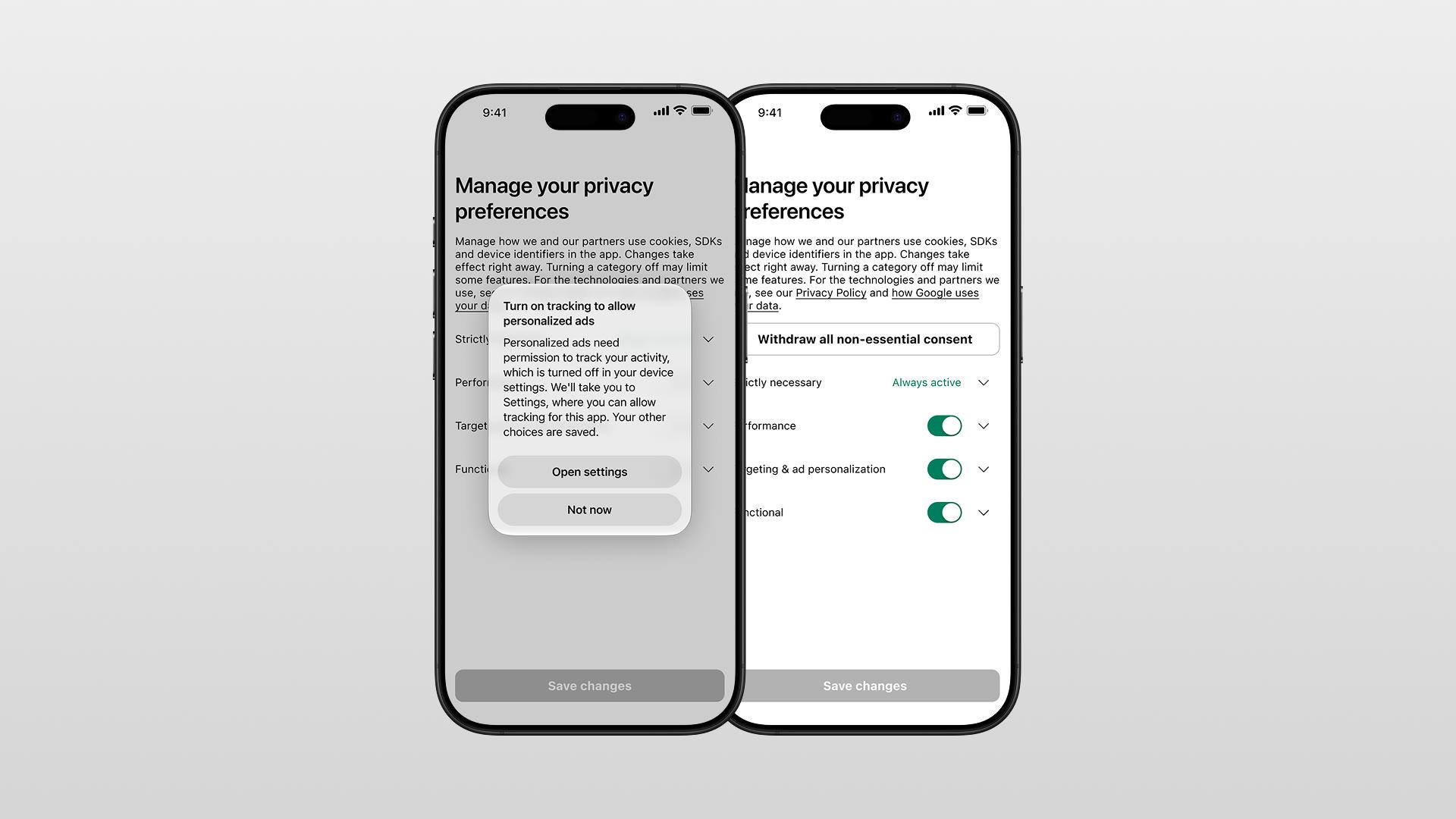

Privacy in a shopping app is more than legal paperwork. It affects customer trust, marketing reach, attribution, and App Store approval. Get it wrong and you can damage install trust, break measurement, and risk rejection. Get it right and customers have clearer choices and your team has more reliable data.
This guide gives product and marketing teams the distinctions they need before reading the deeper guides on tracking, push consent, privacy-center design, retention, and vendors. It covers European and California rules, when Apple's tracking permission applies, how push consent works, and what a usable privacy center needs.
Scope, and what this is not. This is a strategic overview for product and marketing teams. It is not legal advice and not a substitute for a lawyer or a data-protection officer. The rules change often and vary by jurisdiction, and what applies to your app depends on your own data flows, markets, and implementation. Treat everything here as questions to answer with counsel, verify current requirements at the source, and get your specific setup reviewed before you rely on it. This one disclaimer covers the whole article.
The one principle to teach your team
A consent screen is not a privacy policy, and a system permission is not automatically legal consent. These are four separate things. Many commerce-app compliance mistakes begin when a team treats them as one.
- A privacy policy is a disclosure document. It explains what you do. It is usually not, by itself, a consent, though it is often part of a legally required notice or transparency obligation.
- A consent screen is where a customer makes a real, informed choice about optional uses of their data.
- A system permission (the iOS tracking prompt, the Android notifications prompt) is the operating system's control. Granting it is not the same as giving legal consent under European rules, and it does not replace your own in-app choices.
- A customer privacy right (access, deletion, opt-out of sale or sharing) is a workflow you must honor, separate from any consent toggle.
Once a team internalises that these are distinct, most of the design decisions get easier. The rest of this guide walks the layers in order.
The five layers of data in a shopping app
Different activities carry different obligations. Do not treat "the app's data" as one bucket. Separate the activities because each can have a different legal basis and customer promise.
| Activity | Typical requirement |
|---|---|
| Account, cart, checkout, order fulfillment | Usually a service/contract or legal basis, not a marketing toggle |
| Fraud prevention and security | May rely on another lawful basis, subject to the actual implementation |
| Optional analytics | Depends on jurisdiction, SDKs, identifiers, and use case |
| Personalized advertising / remarketing | Consent is commonly needed in Europe; Google requires the relevant user choice to be passed through |
| iOS cross-app/web tracking | Apple ATT permission where Apple's definition of tracking applies |
| Promotional push | OS permission plus explicit in-app marketing consent and an in-app opt-out route |
| California "sale" or "sharing" | An opt-out right for covered businesses, not a European-style opt-in model |
| Account deletion | A rights workflow, distinct from withdrawing marketing or analytics consent |
Necessary service data, optional analytics, advertising tracking, marketing permission, and privacy rights are separate. Where you rely on consent for optional uses, GDPR Articles 5 to 7 require it to be demonstrable, clearly separated, intelligible, and easy to withdraw. They also require purpose limitation, data minimisation, and storage only for as long as necessary. The EDPB says withdrawing consent must be as easy as giving it.
GDPR is not the only rule in Europe
Do not treat "European privacy" as GDPR alone. Electronic-marketing and device-access rules can sit alongside GDPR, and they can require consent where GDPR by itself might not. In the UK, the Privacy and Electronic Communications Regulations (PECR) govern electronic marketing and any technology that stores or accesses information on a user's device, and the ICO's guidance is explicit that this includes mobile apps. Where both regimes apply, you have to satisfy both.
The practical effect for a shopping app:
- Marketing messages (email, SMS, and often app-based marketing) can trigger e-privacy consent rules on top of GDPR, per ICO guidance on PECR.
- Storing or reading data on the device, including SDK identifiers and similar technologies inside an app, falls under the ICO's storage-and-access-technologies guidance, not GDPR alone.
Do not say "GDPR requires consent for analytics and ads" as a blanket rule. Say that consent must be demonstrable, purpose-specific, and easy to withdraw where you rely on it under GDPR or applicable e-privacy rules. Settle the basis for each activity with counsel and your data map.
What the first privacy-choice screen should show
The first privacy screen should help a customer make a real choice, not force them through a legal document. Explain optional uses plainly.
A complete first layer contains:
- The brand (controller) name.
- A short explanation of what is necessary to run the app.
- Separate, plain-language explanations of the optional purposes: analytics and app improvement; personalized advertising and measurement; marketing communications.
- A clear statement that shopping and core functionality still work if the optional choices are declined.
- Equally visible actions, such as Use only necessary data, Allow optional data, and Manage choices. Do not make the accept button loud and the decline button a faint link.
- A route to the privacy policy and detailed vendor information.
- A note that choices can be changed later in Profile or Settings.
For EEA, UK, and Swiss users where Google advertising or measurement is in scope, Google's EU user-consent policy expects a clear notice, an affirmative action, a first-layer reference to ads personalization, disclosure that third parties (including Google) receive data, and a link to Google's own data-responsibility information. In plain terms: do not bury "personalized ads" behind a friendly phrase like "improve your experience."
A customer-friendly example of the first layer:
Your privacy choices We use necessary data to provide your account, cart, checkout, and order updates. With your permission, we also use app activity and device information to understand what works, measure advertising, and show more relevant offers. You can change these choices any time in Profile > Privacy & marketing. Use only necessary data | Allow optional data | Manage choices
The detailed screen behind "Manage choices" should then split the options by purpose (analytics, advertising, marketing), not by vague labels like "marketing partners."
When and how to ask for ATT permission
App Tracking Transparency is an Apple platform requirement, not a replacement for European or California choices. Apple requires the ATT prompt when an app links data from the app with data from other companies' apps, websites, or offline properties for targeted advertising or advertising measurement. Per Apple's user-privacy guidance, it applies even when the identifier is a hashed email or phone number rather than the advertising ID.
The right approach is narrow and honest:
- Ask only when the app genuinely performs Apple-defined tracking.
- Explain the benefit in a short in-app pre-prompt first.
- Then show Apple's system ATT prompt.
- Never gate shopping, content, offers, or rewards on accepting tracking.
- Re-check the permission status on later launches and stop tracking if it is no longer authorized.
Apple allows a transparent pre-prompt but prohibits manipulation, withholding functionality, or paying people to grant tracking permission. For example:
Help us measure our advertising If you allow tracking, we can measure which ads bring customers to the app and make our advertising less repetitive. Your shopping experience works either way. Continue | Not now
The system purpose string should say what the data does, not make a generic "for a better experience" claim, for example: "We use your device identifier to measure advertising performance and personalize advertising across other companies' apps and websites." Only show this if it is true. If your app uses first-party, same-brand analytics with no cross-company tracking, ATT may not apply at all, but that determination belongs in your data mapping and legal review. For the full decision, the purpose-string wording, and what happens to your ad measurement when a customer declines, see App Tracking Transparency: when an e-commerce app needs ATT and how to ask.
Keep notification consent separate from marketing
Push permission is easy to waste. A commerce app should not blur "let us keep you posted on your order" with "let us market to you." On Android 13 and later, new apps need the POST_NOTIFICATIONS runtime permission, and Android recommends asking in context with a clear explanation. Apple also requires user authorization for potentially disruptive notifications.
There are four distinct things at play, and treating them as one is where brands get into trouble:
- Order, delivery, security, and account messages.
- Back-in-stock, price-drop, loyalty, and promotional messages.
- The device's system-level notification setting.
- The brand's own in-app marketing preference.
Apple's App Review Guidelines require explicit in-app consent for promotional push and an in-app way to opt out, and push cannot be required for the app to function. So ask in context, then offer categories:
Get notified when it matters Turn on notifications for delivery changes, saved-item restocks, and the offers you choose. You can change categories or turn them off any time. Enable notifications | Not now
Categories might be: order and delivery updates; back-in-stock and price drops; loyalty and rewards; new drops and sales. The rule that matters: never imply that accepting delivery updates means the customer consented to promotional marketing. For the full breakdown of the two separate decisions behind push consent and how to design the preference center, see push-notification consent: permission, marketing consent, and preference-center design. For running push well once consent is in place, see push notifications: the retention channel Shopify brands haven't built yet. Push has its own voice; it is not a cheaper email.
The privacy center in Profile
The privacy center should be an app screen, not a link buried in a legal page. Customers need an obvious path to change their choices, and the controls must have an effect. A suggested structure:
Profile
  Privacy & marketing
    - Your privacy choices
        - Use only necessary data / Withdraw optional consent
        - Analytics and app improvement
        - Personalised advertising and measurement
    - Marketing preferences
        - Push: order updates / restocks / loyalty / offers
        - Email preferences
        - SMS preferences
    - Device permissions
        - Tracking: status + "Open device settings"
        - Notifications: status + "Open device settings"
    - Your California privacy choices
        - Do Not Sell or Share My Personal Information
        - Limit the Use of My Sensitive Personal Information  (only if you process sensitive PI)
    - Download my data / request access
    - Delete account / request deletion of personal data
    - Privacy policy
    - Our service providers and subprocessors
Two design notes on that tree. First, "Delete account" and "request deletion of personal data" are related but not always the same workflow, so label the action for what it does rather than implying one button erases everything. Second, rights requests are not a simple button press: access and deletion can require identity verification, and they are subject to statutory exceptions (for example, order and tax records you are obliged to keep). Design the flow to verify the requester and to explain what can and cannot be deleted, rather than promising instant total erasure.
The "withdraw optional consent" action also has to do more than flip a visual toggle. To be real, it should stop optional SDK collection and forwarding, stop personalized-ad audiences and future marketing where relevant, update the consent state in connected systems, prevent queued optional events from being sent, retain a minimal audit record of the change, and show a confirmation with an effective date.
Implementation matters more than intent. For Google Analytics for Firebase, consent mode supports default states and updates for analytics_storage, ad_storage, ad_user_data, and ad_personalization. The selected state persists until it changes. A withdrawal mechanism must update the SDK state, not merely repaint the interface. For the full screen design, see how to design a mobile-app privacy center customers can actually use.
Why California needs its own CCPA/CPRA treatment
For businesses subject to CCPA/CPRA, California's model differs from Europe's. Do not reuse a European opt-in screen and call it done. California consumers have rights to know, delete, correct, limit certain sensitive-data use, and opt out of the sale or sharing of their personal information. "Sharing" can include cross-context behavioral advertising. Per the California Attorney General's CCPA guidance, a covered business must give notice at or before collection, describe data categories and purposes, and provide an opt-out route and privacy-policy link where data is sold or shared.
The important design consequence: Europe is largely an opt-in model for optional uses, while California is largely an opt-out model. Use clear, named controls:
Your Privacy Choices Do Not Sell or Share My Personal Information Limit the Use of My Sensitive Personal Information
Show "Limit the Use of My Sensitive Personal Information" only if the business actually processes sensitive personal information in a way that triggers the right. It is not a universal menu item, and adding it when it does not apply is its own kind of misleading.
Global Privacy Control and opt-out signals
California requires more than an in-app button. Covered businesses that sell or share data must honor valid opt-out preference signals such as Global Privacy Control (GPC). California enforcement examples criticize retailers that failed to honor GPC. A 2026 settlement also addressed device-by-device GPC handling for logged-in people.
GPC is primarily a browser-based signal, so the mapping to a native app takes care:
- The app should offer its own clear privacy controls (the "Do Not Sell or Share" action above).
- The website must honor applicable browser-based opt-out preference signals like GPC.
- Where the person is authenticated across web and app, counsel should determine how a recognized opt-out is applied across that customer relationship, rather than treating each device in isolation.
The California Privacy Protection Agency also stresses that privacy choices must be clear and balanced, not dark patterns designed to discourage opt-outs. A decline should be as easy as an accept, in California and everywhere else.
The consent ledger and the data map
A consent record should show a real decision, not a vague consent = true field. You need to know what was shown and what the customer chose. Store only what is needed to demonstrate and apply that choice:
- Internal customer/device or pseudonymous identifier
- Region and language at the time of the decision
- Date and time
- App version and consent-screen version
- The exact purposes shown, and the vendor/SDK set shown
- The choice for each purpose
- How the choice was collected
- Withdrawal and change history
- Downstream propagation status, where relevant
Do not put raw behavioral history, full screen recordings, or unnecessary identifiers in the consent ledger. Keep a data map alongside it that records the purpose, lawful basis, system, recipient, region, retention rule, deletion route, and owner for each data type. Use that map for privacy notices, App Store labels, CCPA disclosures, deletion requests, and subprocessor lists.
DPIA checkpoint. When your data map surfaces higher-risk processing, for example systematic monitoring, sensitive data, or large-scale profiling, ask your DPO or counsel whether a Data Protection Impact Assessment is required before you build. The data map is what tells you whether you have crossed that line.
There is no universal retention period
There is no rule that says "keep data for X years." Data must not be retained longer than necessary for its stated purpose, so different data needs different retention periods. A defensible schedule might look like this:
| Data | Retention approach |
|---|---|
| Orders, invoices, tax data | Keep for the applicable legal/accounting period |
| Account data | Active account plus a defined closure period, unless another obligation applies |
| Raw app events | Keep only as long as needed for product and campaign analysis; aggregate or delete afterwards |
| Crash and diagnostic logs | Short operational window, then aggregate or delete |
| Push tokens | Delete or invalidate when permission is withdrawn, the token becomes invalid, or an uninstall is detected |
| Marketing preferences | Keep a minimal suppression record long enough to honor the opt-out |
| Consent evidence | Retain only as long as needed to demonstrate the decision and handle claims |
| Backups | Document the expiry cycle and confirm deletion completes as backups age out |
| Support records | A defined customer-service and legal-claim period |
Reject both lazy extremes. "Keep it forever in case it is useful" conflicts with storage limitation. "Delete everything immediately" can conflict with tax, fraud, warranty, or suppression obligations. For the full schedule template, how deletion works across backups and third parties, and the rights-request workflow, see mobile-app data retention and deletion: what to keep, why, and for how long.
Subprocessors, SDKs, and privacy notices
A subprocessor list is not a logo wall. For each company that processes personal data on your (or your provider's) instructions, you should be able to state the legal entity name, the service and processing purpose, the categories of data involved, whether it acts as a processor/subprocessor or an independent controller, the processing location(s), the international-transfer mechanism where relevant, a link to its DPA or privacy documentation, the date added and status, and how customers are told about changes.
A typical commerce-app stack includes cloud hosting and database infrastructure, a CDN, an authentication provider, error monitoring and crash reporting, product analytics, push-delivery infrastructure, a customer-support platform, an email/SMS provider, a data warehouse, attribution and advertising SDKs, the Shopify and checkout integrations, and Apple and Google services. Do not automatically label every vendor a subprocessor: an advertising platform, a payment provider, or an app-store operator may act under a different legal role depending on the flow and contract, and that role analysis has to be accurate.
One platform-specific point: Apple requires apps to disclose data collected by third-party SDKs in App Store privacy information, and to explain third-party sharing, retention and deletion, and consent withdrawal in the privacy policy. Those App Store privacy labels are part of your store listing, and getting them wrong is a rejection and trust risk in the same way a bad listing is. If you are working through your listing, see how to fill in your app store listing without getting rejected. For the full vendor checklist, the role analysis, transfers, and SDK disclosures, see vendor-role registers, subprocessors, and SDK privacy notices for commerce apps.
Consent signals for analytics and ads
If you run analytics or ads for EEA users, the consent choice must reach the systems that process the data. A customer can decline personalized advertising in the first layer, but if the SDKs and ad platforms never receive that choice, you still collect and forward data as if they said yes.
For Google Analytics for Firebase and Google's ad products, consent mode is the mechanism that carries the choice: default states set before collection, and updates when the customer decides, across analytics_storage, ad_storage, ad_user_data, and ad_personalization. A consent-management platform (CMP) can orchestrate this, but the principle holds regardless of tooling: the state your customer picked has to be the state your SDKs are in. For how consent mode actually behaves (including why "denied" does not always stop data to Google), how a CMP fits, and why the choice has to reach your non-Google SDKs too, see Google Consent Mode and CMPs for mobile apps.
What your team needs to produce
Privacy for an app is more than one screen. Before launch, a Shopify brand should have all of these:
- A data map - data type, purpose, lawful basis, system, recipient, region, retention, deletion route, owner.
- A vendor-role register - each vendor named, with its actual legal role (processor, subprocessor, or independent controller) and transfer mechanism.
- Consent design - a first-layer choice and a per-purpose detail screen, with decline as easy as accept.
- A propagation test - proof that a declined or withdrawn choice actually changes SDK state, not just the UI.
- A rights workflow - access, deletion, correction, and opt-out, with identity verification and documented exceptions.
- A retention schedule - per data type, not one blanket number.
- Store disclosures - App Store and Play privacy labels that match the data map, plus the privacy-policy sections Apple and Google require.
If any one of these is missing, the others get harder to trust. This checklist is also the fastest way to see where an existing app is exposed.
How NAPPS helps
NAPPS builds the privacy screens above for Shopify and Shopify Plus brands: a first-layer consent choice, a privacy center in Profile, in-context ATT and notification prompts, and push preferences by category. Apps publish under your Apple and Google accounts, with your App Store and Play privacy labels.
Consent propagation is standard, not an optional add-on. When a customer declines or withdraws a choice, NAPPS updates the consent state across the integrations you have turned on and configured: storing the purpose-level choice, updating the relevant SDK consent APIs before collection, and stopping the forwarding of future optional events. This is not a native-versus-webview advantage (a webview can honor consent, and a native app can fail to); it is a base requirement we build in, because an app that ignored these choices would risk App Store and Play rejection. What varies between brands is which integrations are enabled, not whether the choices are respected. What NAPPS does not do is make the legal determinations for you: your lawful bases, your retention schedule, your subprocessor roles, and your jurisdiction analysis are yours to set with counsel, and the app is built to honor them.
For a broader view of everything an app needs at launch, see how to turn a Shopify store into a mobile app (2026), and for regulated categories where store approval is its own hurdle, can you sell CBD, cannabis, or vapes through a mobile app?.
Further reading on privacy, consent, and permissions
Each area below has its own detailed walkthrough:
- App Tracking Transparency: when an e-commerce app needs ATT and how to ask: whether your app performs Apple-defined tracking at all, how to ask well, and how to keep measuring when a customer declines.
- Push-notification consent: permission, marketing consent, and preference-center design: the two separate decisions behind push, keeping service messages distinct from marketing, and designing a preference center customers keep switched on.
- How to design a mobile-app privacy center customers can actually use: the operational build spec: mapping purposes to controls, setting state before SDKs run, what "off" really does, and the QA cases that prove it.
- Mobile-app data retention and deletion: what to keep, why, and for how long: building a defensible retention schedule by purpose, and how deletion really works across backups and third parties.
- Vendor-role registers, subprocessors, and SDK privacy notices for commerce apps: working out each vendor's real legal role, and handling SDK disclosures, transfers, and store labels.
- Google Consent Mode and CMPs for mobile apps: what Consent Mode actually does, basic versus advanced behavior, and why the choice has to reach every SDK, not just Google's.
Frequently asked questions
No. An operating-system permission, such as Apple's tracking prompt or Android's notifications prompt, is the platform's control. Granting it is not automatically valid consent under European rules, and it does not replace the in-app choices you need for optional analytics, advertising, or marketing. They are separate layers that have to line up.
No. There is no fixed number. The rule is storage limitation: data must not be kept longer than necessary for the purpose it was collected for. That means different retention periods for orders, account data, raw events, logs, push tokens, and consent evidence, rather than one blanket period applied to everything.
When the app links its data with data from other companies' apps, websites, or offline properties for targeted advertising or advertising measurement, including when the identifier is a hashed email or phone number. If the app only does first-party, same-brand analytics with no cross-company tracking, ATT may not apply, but that determination belongs in your data mapping and legal review.
Europe is largely an opt-in model for optional data uses, and consent must be freely given, specific, and easy to withdraw. California's CCPA/CPRA is largely an opt-out model: covered businesses give notice at collection and must offer a clear way to opt out of the sale or sharing of personal information, honor opt-out signals like Global Privacy Control, and limit sensitive-data use where that right applies. You generally cannot reuse a European opt-in screen to satisfy California.
No. Apple prohibits gating functionality on accepting tracking, and push notifications cannot be required for the app to work. Shopping, content, offers, and rewards have to work whether or not a customer accepts tracking or notifications.
Straight from the source
These rules change, so check the current versions directly:
- Europe: the GDPR text (Articles 5 to 7), EDPB guidance, and, in the UK, the ICO on PECR and storage-and-access technologies.
- Apple: the App Store Review Guidelines, App Tracking Transparency, and the user-privacy and data-use pages.
- Google / Android: the notifications permission guidance, the EU user-consent policy, and consent mode for apps.
- California: the Attorney General's CCPA pages, the enforcement examples, and the California Privacy Protection Agency.
The bottom line
Privacy in a shopping app has five separate parts: necessary service data, optional analytics, advertising tracking, marketing permission, and customer rights. Keep them separate. Give customers a real choice for optional uses, make declining as easy as accepting, and make sure the choice reaches your SDKs. Where you rely on consent under GDPR or applicable e-privacy rules, it must be demonstrable, purpose-specific, and easy to withdraw. California adds opt-outs of sale and sharing, plus the duty to honor signals such as GPC. Apple and Google add their own permission mechanics.
If you are planning a Shopify app and want the privacy surfaces built in from the start rather than patched on later, book a 20-minute call with the NAPPS team and we'll show you how the consent screens, privacy center, and permission prompts come together in a native app, with consent applied across the integrations you've enabled, so you can take that into your legal and platform conversations before you build.
Keep reading
October 27, 2026 - 10 min read
4 MobiLoud alternatives for Shopify: pricing and fit


October 23, 2026 - 8 min read
Tapcart vs Shopney: pricing, features, and which fits your Shopify store
September 18, 2026 - 13 min read
Tapcart Alternative: NAPPS Pricing, Features & Migration