

Wednesday, July 8th 2026
Push notifications: the retention channel Shopify brands haven't built yet
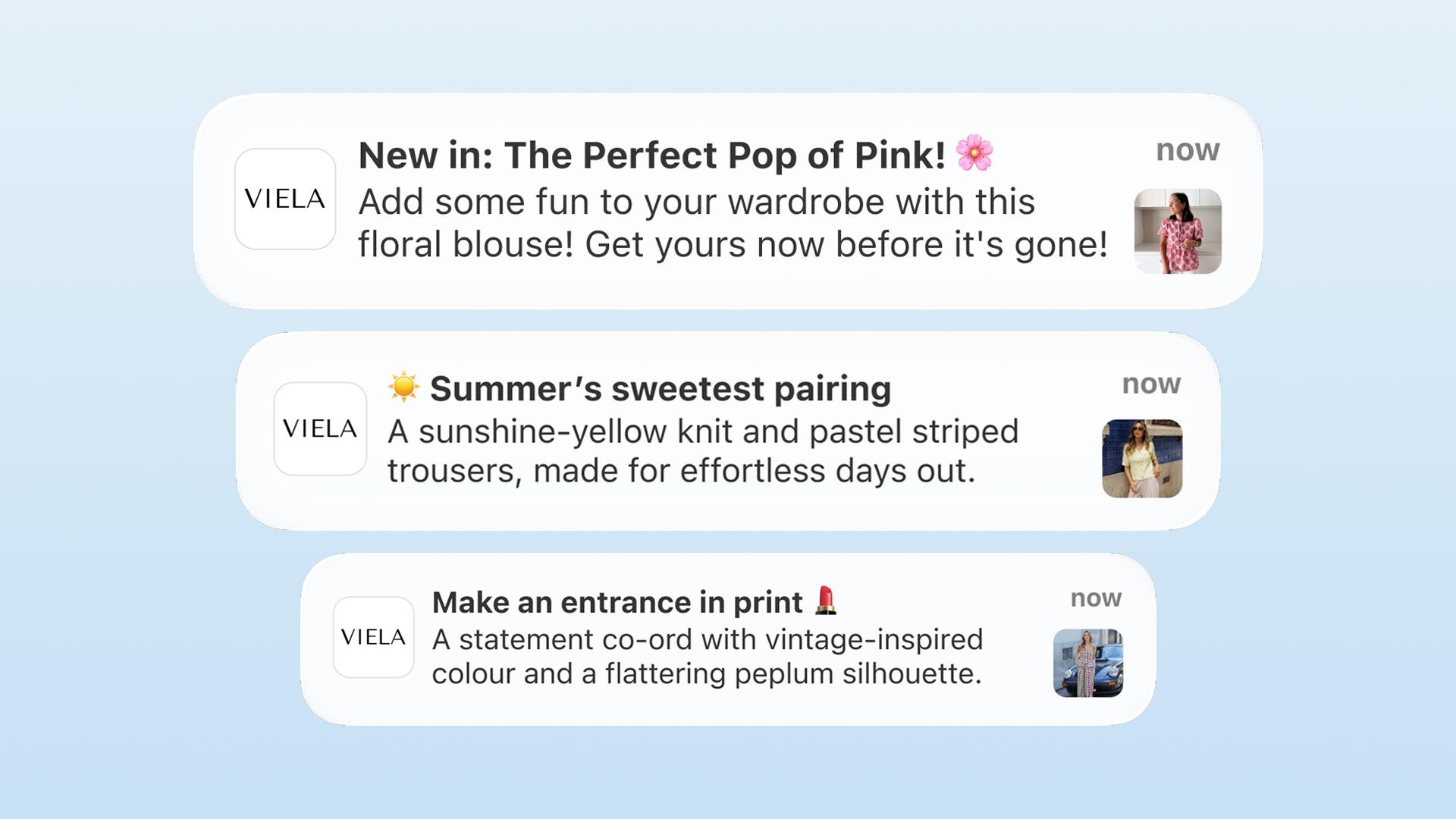

Push notifications are messages a brand's mobile app sends straight to a customer's lock screen, with no inbox or phone number involved. For Shopify brands they are the retention channel most often missing. Email and SMS programs are mature, but push needs an app and a plan for after launch, and many brands have neither.
This article covers what makes push different from other channels, what a complete push program looks like, and the controls that help you run it responsibly. The results cited are NAPPS observations, not a guarantee for every brand. For opt-in flows, copywriting, timing, and measurement, see our complete guide to push notifications for Shopify.
Your retention stack has a missing layer
Look at how much infrastructure sits behind your email channel. Flows, segments, A/B tests, a calendar, probably a dedicated person or agency. SMS is heading the same way.
At most brands, push has none of that. It is not a channel they actively run. It is a launch checkbox: a welcome message, perhaps an abandoned-cart trigger, then silence.
That's a strange place to leave a channel that, for brands with an installed, opted-in audience, is often one of the highest-engagement they own.
Push does not replace email or SMS. Email carries depth through storytelling, education, and long-form offers. SMS carries urgency to an opted-in list. Push is short, immediate, and one tap from the product. Brands with strong retention coordinate all three around distinct jobs.
The difference is that email and SMS programs are table stakes now. A mature push program is still uncommon. That's the opportunity.
What makes push structurally different
Push notifications can land straight on the lock screen (where the customer's settings allow), avoiding the email inbox, with no per-message send cost, and no email address or phone number required. That combination doesn't exist anywhere else in your stack.
Break that down:
- It avoids the email inbox. An email competes with everything else that arrived that day. A push skips the inbox entirely, though it still competes for notification attention with other apps, Focus and Do Not Disturb modes, and notification summaries.
- No per-message send cost. Push is delivered through the platforms' own infrastructure (Firebase Cloud Messaging on Android, Apple Push Notification service on iOS), which carries no per-message charge, so unlike SMS the cost doesn't scale with volume. The program still takes setup, creative, and time, but sending one more message is free.
- Reaches anonymous users. A customer who installed your app but never created an account, with no email and no phone number on file, is still reachable by push. No other retention channel can say that.
- A short path to conversion. On an app built for it (persistent login, saved cart, working deep links), a push opens straight to a product, collection, or campaign, with no login wall or slow redirect, landing the customer close to checkout. That's a capability to build well, and it's where a slow app (webview or native) leaks the intent the push created (more on that below).
Based on NAPPS customer data, active customers running push, loyalty, and app-only content have seen 15% to 45% of online revenue come through the app in the months after launch. This is an observed range across a self-selected group of brands, not proof that push caused it. Push works alongside loyalty and exclusives, and app adopters tend to be more engaged before they install.
What a complete push program looks like
A complete push program has two halves: always-on automations that run in the background, and campaign pushes sent for moments. Most brands that "do push" only have fragments of the first half.
The always-on automations
Set these once. They run forever, triggered by customer behavior:
- Welcome series. A short sequence in the days after install that introduces the app's benefits and pulls the customer toward their first in-app purchase. The first session sets the habit; the welcome series protects it.
- Login reminders. Logged-in users convert better than anonymous ones. Their cart, order history, and loyalty balance follow them. A gentle prompt for installed-but-anonymous users to sign in unlocks every personalized automation that follows. Brands are increasingly sweetening this with store credit that unlocks on first login, which turns "sign in" from a chore into a payout.
- Abandoned cart. Usually among the highest-intent triggers you have. The customer already chose the product.
- Back-in-stock. A purchase that was already decided, just delayed. Push turns the restock into revenue close to when it happens.
- Order status updates. Shipping and delivery notifications customers actually want. Keep them as service notifications, not marketing; they can establish a useful expectation that your notifications are worth opening.
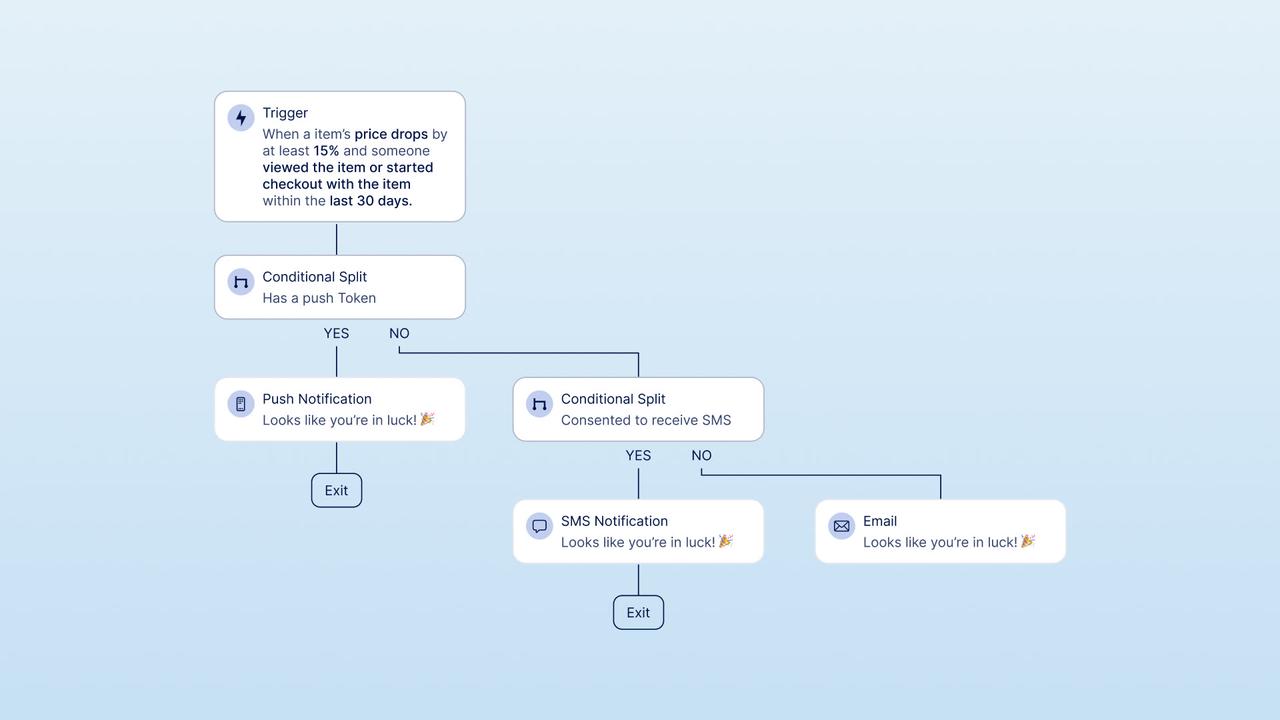
- Price-drop alerts. When a wishlisted product drops in price, the customer who wanted it finds out first.
The campaign pushes
These are the moments you create:
- New collection drops. Announce to everyone, or give a segment early access.
- App-exclusive releases. Products or prices that only exist in the app. Exclusivity turns the notification itself into a reward for having installed. (App-only pricing has to comply with local pricing and marketing rules, so check those for the markets you sell in.)
- Seasonal promotions. Sale starts, sale-ending reminders, holiday and app-exclusive campaigns.
- Live event and drop reminders. Time-sensitive pushes for moments where minutes matter.
Automations build a habit. Campaigns create spikes. You need both. Automations alone feel transactional, while campaigns alone feel like noise.
Getting push right: what separates a program from spam
The channel is powerful, which means it's easy to burn. Opted-out users don't come back. A few rules keep the channel healthy:
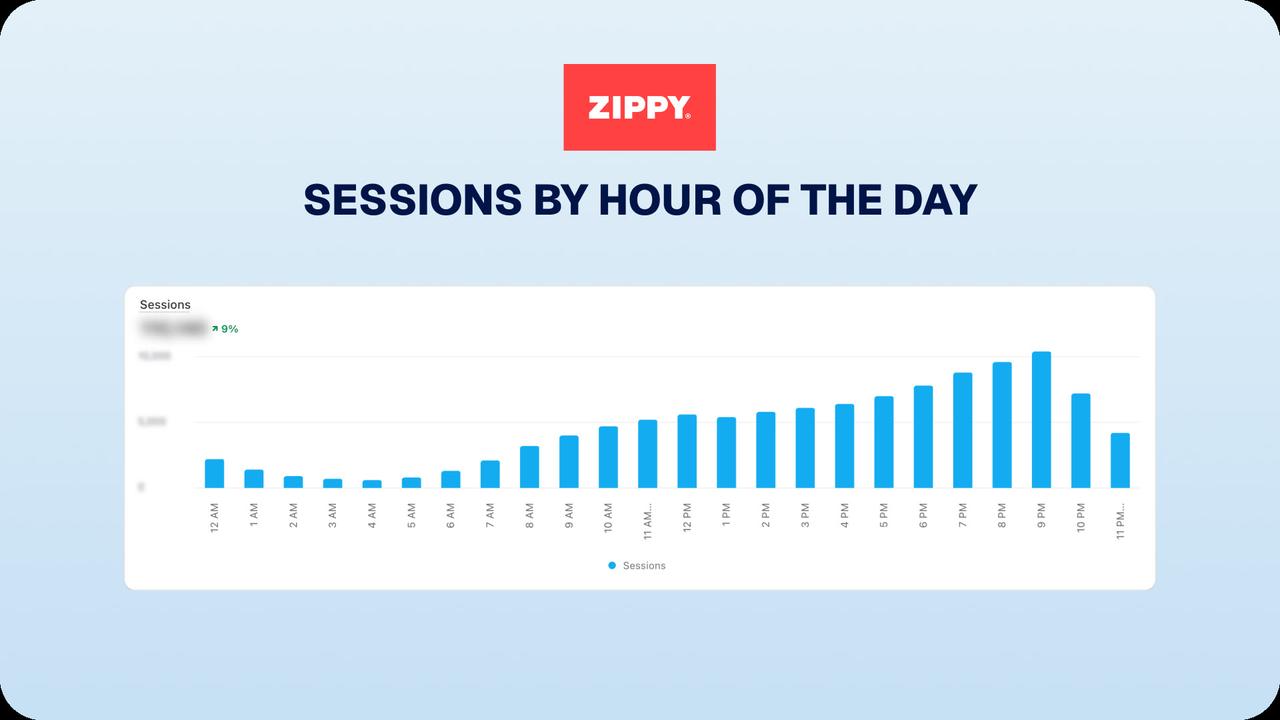
- Send when customers are active, not at dead hours. Engagement is not evenly spread across the day. Zippy, Portugal's largest children's fashion brand, used in-app analytics to find its audience's activity peak, around 9 PM, and timed campaign pushes for that window. Find your own peak before scheduling anything.
- Personalize with behavior, not just a first name. Past purchases, wishlists, and browsing behavior tell you what to send and to whom. A price-drop alert on a wishlisted product will often outperform a generic promotion, because the intent signal behind it is stronger.
- Respect the format. Keep titles short, roughly 25 to 50 characters, and front-load the body. Visible length varies by operating system, device, language, and settings, so test on real devices rather than trusting a fixed count. Push is a headline, not a paragraph. If it needs explaining, use email.
- Make urgency real. "Limited time" and "only a few left" work when they're true. Customers learn fast when they're not.
- Segment before you send. Time zone, market, purchase history, opt-in status. A push that's relevant to everyone is usually relevant to no one.
- Set global frequency caps and campaign priorities. Behavior-triggered automations don't fully self-regulate: one customer can be eligible for an abandoned-cart reminder, a price-drop alert, and a sale announcement on the same day. Cap total sends per customer, set priority rules so the most relevant message wins, apply quiet hours, and suppress across channels so push, email, and SMS don't all fire at once.
- Get consent right, and keep transactional separate from marketing. The system "Allow" is a platform permission, not marketing consent. Apple requires promotional and direct-marketing pushes to use explicit in-app opt-in consent language and an in-app opt-out, and notifications can't be required for app functionality or tied to compensation (Apple's App Review Guidelines, 4.5.4 and 5.1.1). Treat system permission, marketing consent, and notification preferences as three separate controls, and confirm the legal requirements for the markets you target, since they vary. We go deeper in the complete guide.
Zippy case study: push notifications in practice
Zippy launched its native app with NAPPS in July 2025 and built push into its retention plan from day one. It ran automations, timed campaigns to its 9 PM engagement peak, and reserved exclusives for app users.
The App Growth Playbook recorded these figures from July 2025 to February 2026:
- 21% average push open rate
- App conversion rate of 7.20%, vs 1.53% on mobile web
- The app grew to roughly 34% of total online revenue within seven months
A note on these figures, because the comparison matters. They're one brand's results, and the definitions should be read with care: "open rate" and "conversion rate" depend on how each is counted (unique vs total opens, opens over delivered, the attribution window and market), and "34% of online revenue" is the app channel's share of the brand's online sales, not an independently audited number. Most importantly, the 7.20% versus 1.53% conversion gap compares two self-selected groups: app users are typically a brand's more engaged, higher-intent customers before they ever install, so the gap overstates what the app itself causes. Read it as a strong directional signal, not a controlled measurement.
One app-only campaign, announced by push only to opted-in customers, coincided with the highest online sales day in the brand's history, ahead of Black Friday and Christmas. Treat it as a campaign outcome rather than proof that push alone caused it. The app-only offer, audience quality, and timing all played a part.
That is what an owned channel with real reach can look like: a message reaching customers who chose to hear from you, rather than a discount sent everywhere.
Why the app experience matters for push
Push notifications get customers to tap. What happens after the tap is decided by what your app is built on.
If the app is a webview, a browser rendering the mobile site inside a shell, a push tap may open something close to the mobile-web experience the customer already had. Webviews can be improved with caching, persistent authentication, and deep links, but they inherit more web constraints. Without that work, sessions can feel slow and customers may open the app less.
How well the tap converts is really an implementation question, not a native-versus-webview law. A well-built native app can offer fast loads, persistent login, a saved cart, and reliable deep links, landing the customer close to checkout, but a native app can be slow too, and a webview can be tuned. The point is to build for that outcome. We break down the trade-offs, and how to check which one you have, in our webview explainer. When login, cart persistence, and deep links are implemented well, they reduce friction for returning users, which is the behavior push depends on.
How NAPPS fits in
NAPPS is a native mobile app builder for Shopify and Shopify Plus brands. Every plan includes unlimited push notifications, with no volume tiers.
The push tooling covers both halves of the program: behavior-triggered automations (welcome series, login reminders, abandoned cart, back-in-stock, order status, price drops) and scheduled campaign pushes with rich media, AI-assisted copy, and segmentation by market, behavior, and logged-in status.
And because push works best alongside your other channels, NAPPS integrates directly with Klaviyo and Ometria, so you can segment by app behavior, suppress overlap, and let push, email, and SMS coordinate instead of competing.
FAQ
No. Push, email, and SMS do different jobs. Email carries depth and storytelling, SMS carries urgency to opted-in numbers, and push delivers short, immediate messages one tap from the product. The strongest retention stacks run all three together.
It varies by category, program quality, and how you count it (unique vs total opens, opens over delivered). As one data point, Zippy, a NAPPS customer in children's fashion, averages a 21% push open rate with behavior-timed sends and app-exclusive campaigns. Track your own trend rather than chasing a single benchmark.
Web push exists and can support triggers and deep links, but it typically sees lower opt-in rates and gives you a less controlled destination than an app. The richer, app-native program described here is built around having an app.
There's no universal number. Automations fire on behavior, but they don't fully self-regulate: a customer can trigger several at once, so set global frequency caps, priorities, and quiet hours. Hold campaign pushes to moments genuinely worth an interruption. Rising opt-out rates are the signal you've overdrawn the channel.
The bottom line
Push is still underused at many Shopify brands. It avoids the email inbox, has no per-message send cost, reaches customers without an email address, and can lead straight to a product. Brands that build a real push program, rather than checking a box at launch, have seen the app become a meaningful share of online revenue alongside loyalty and app-only offers.
The channel is straightforward. The work is building the app experience and program around it.
See how push works on a NAPPS app
Unlimited push on every plan, always-on automations and campaigns in one place, and a native tap-through that lands logged-in with the cart intact.
Book a 20-minute callKeep reading
October 27, 2026 - 10 min read
4 MobiLoud alternatives for Shopify: pricing and fit


October 23, 2026 - 8 min read
Tapcart vs Shopney: pricing, features, and which fits your Shopify store
September 18, 2026 - 13 min read
Tapcart Alternative: NAPPS Pricing, Features & Migration