

Wednesday, September 9th 2026
The complete guide to push notifications for Shopify (2026)
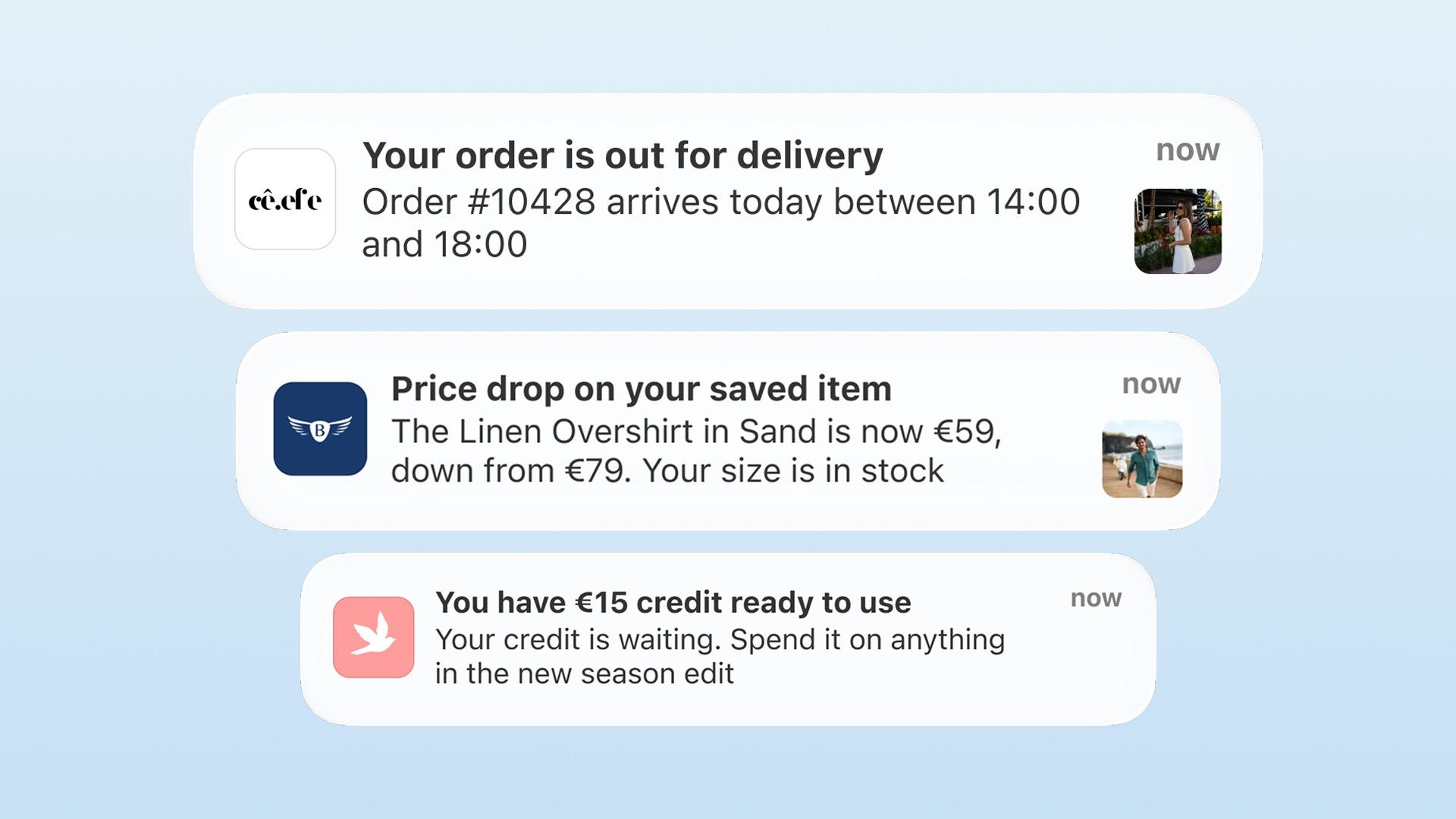

Push notifications for Shopify are messages your mobile app sends to customers who opted in, reaching them without an inbox or a phone number. They work best alongside email and SMS, not instead of them. A working program needs four things: a won opt-in, clear marketing consent, the right automations and campaigns, and measurement of what push really adds.
This guide is the complete reference: what push notifications are and how they work for Shopify stores, how to win the opt-in and handle marketing consent, which automations and campaigns to run, how to write and time messages, and how to measure whether the program is working. If you want the strategic argument for why push deserves a place in your retention stack, we've made that case separately in push notifications: the retention channel Shopify brands haven't built yet. This is the how.
What are push notifications for Shopify stores?
A push notification is a short message sent from your app to a customer's device. Where it appears, or whether it appears at all, depends on the customer's OS settings, notification channels, and Focus or Do Not Disturb modes. A tap can open a configured deep link to a product, collection, or campaign.
Two types exist, and the difference matters:
| App push | Web push | |
|---|---|---|
| Requires | Your mobile app installed | Browser permission |
| Delivery | Uses the app's native notification system, subject to the user's OS and notification settings | Varies by browser, device, and browser permission |
| Opt-in rates | Depend on the audience, timing, and permission flow | Depend on the audience, timing, browser, and permission flow |
| Destination on tap | An app-native destination you control (a fast session with a saved cart, when the app is built for it) | A mobile web session |
| Depth | Rich, app-native experiences: deep links, behavior triggers, rich media | Can support triggers and deep links, but with a less controlled destination |
When this guide says push, it means app push. Web push can do more than it's often credited for (modern web-push tools support triggers and deep links), but app push gives you a more controlled, app-native destination and experience, which is what the programs in this guide are built around.
Why push earns its place in the stack
Push notifications combine four useful properties:
- No email inbox. Push appears through the device notification system, though it still competes with other apps, notification summaries, and the customer's settings.
- No per-message send cost. Push rides on the platforms' own delivery infrastructure (Firebase Cloud Messaging on Android, Apple Push Notification service on iOS), which has no per-message charge, so unlike SMS the cost doesn't scale with volume. It isn't cost-free overall (the app platform, implementation, segmentation, creative, analytics, consent management, and team time all count), but sending one more message is free.
- Reach without contact details. A customer who installed your app but never created an account is still reachable. No email, no phone number, no problem.
- A short path to conversion. When the app is built for it (persistent login, saved cart, working deep links), the tap can land the customer one step from checkout. That's a product capability to get right, not an automatic property of every app.
Push does not replace email or SMS. Email carries depth and storytelling, SMS carries urgency to opted-in numbers, and push delivers short immediate messages one tap from a product. Coordinate all three.
Step 1: Win the opt-in
Everything in this guide depends on the customer allowing notifications. Treat that as a conversion event.
The rules that protect it:
- Don't ask cold. Give customers a reason to understand the value first, then ask in context. Android 13+ requires runtime permission for non-exempt notifications and recommends explaining the benefit before showing the prompt. Show a short screen explaining the relevant benefit, such as order updates, exclusive drops, or back-in-stock alerts, then trigger the system prompt. Android's notification-permission guidance explains the platform behavior.
- Lead with the customer's benefit. Explain what the customer will receive, such as "Be first when the drop goes live," rather than using a generic "Enable notifications" prompt. Test the wording and timing on your own audience.
- Put it in the onboarding flow. Market selection, push opt-in, account creation: a clean first-open sequence sets up the whole relationship. Your launch plan should treat the opt-in flow as a day-one asset, not an afterthought.
- Keep order updates separate from marketing. A customer who accepts order updates has not necessarily agreed to promotions. Keep service notifications distinct from marketing and settle the legal basis for each message type with counsel.
- Have a recovery path, not a nag. If a customer declines, don't interrupt them repeatedly. Offer a clear, non-coercive route back (a settings link with the benefit restated) and lean on in-app alternatives, like an inbox or a badge, for customers who keep push turned off.
Consent: permission is not the same as marketing consent
This is where the compliance risk sits. The system-level "Allow Notifications" prompt is a platform permission, not a complete marketing record. For promotional or direct-marketing pushes, Apple's current App Review Guideline 4.5.4 requires more:
- Explicit opt-in for marketing push. Under App Review Guideline 4.5.4, promotional and direct-marketing notifications require explicit opt-in through consent language in the app UI, plus an in-app way to opt out. Device permission alone does not meet that Apple requirement.
- Push can't be mandatory. Apple says push notifications cannot be required for the app to function. For any incentive tied to a marketing choice, get jurisdiction-specific legal advice before implementation.
- Never put sensitive or confidential information in a push. Apple explicitly prohibits it. A notification can be read on a lock screen by anyone holding the phone, so keep personal, financial, health, or account-sensitive details out of the message body (this applies to order updates too: "Your order has shipped" is fine, specifics are not).
Practically, that means separating two kinds of notification and documenting the basis for each:
| Transactional / service | Promotional / marketing | |
|---|---|---|
| Examples | Order confirmed, shipped, delivered; security and account messages | Drops, sales, app-exclusive offers, back-in-stock promotions |
| Consent basis | Device authorization plus the lawful basis appropriate to the message and jurisdiction | Device authorization, Apple's explicit in-app opt-in where applicable, and the lawful basis appropriate to the jurisdiction |
| Also governed by | Platform permission | Platform permission, marketing consent, and (EU/UK) data-protection law |
The practical setup is a preference center inside the app: let customers choose categories, toggle them independently, and change their mind any time. It can provide the in-app opt-out Apple requires while letting a customer mute promotions without losing order updates. For a fuller implementation guide, see push-notification consent and preference-center design.
For EU and UK brands especially, treat a system "Allow" as the start of consent, not the whole of it. Marketing consent is a separate, documented choice, and it's a point to confirm with your own legal or privacy advice rather than infer from a guide.
Step 2: Build the two halves of the program
A complete push program has two halves. Most brands that "do push" have fragments of one.
The always-on automations
Set once, triggered by customer behavior, running forever:
- Welcome series. A short sequence after install that introduces the app's benefits and nudges the first purchase.
- Login reminders. Use these only when an account unlocks a clear customer benefit, such as order history, saved preferences, or loyalty status.
- Abandoned cart. The highest-intent trigger you have; the customer already chose the product.
- Back-in-stock. A purchase that was already decided, just delayed.
- Order status updates. Useful service notifications for confirmation, shipping, and delivery changes.
- Price-drop alerts. When a wishlisted product drops, the customer who wanted it hears first.
The campaign pushes
The moments you create:
- New collection drops, announced to everyone or with early access for a segment
- App-exclusive releases: products or prices that only exist in the app
- Seasonal promotions: sale starts, sale-ending reminders, holiday campaigns
- Live event and drop reminders, where minutes matter
- Balance nudges: reminders about unspent store credit or loyalty points
Automations build the habit and campaigns create spikes. Automations alone can feel transactional. Campaigns alone can feel like noise. Run both.
Step 3: Write pushes that get tapped
Push is a headline, not a paragraph. These are copy recommendations to test on real devices, not fixed platform limits:
| Element | Recommendation |
|---|---|
| Title | Keep it short, roughly 25-50 characters |
| Body | Front-load the message. Visible length varies by OS, device, language, and notification settings, so test on real devices rather than trusting a fixed count. FCM allows a 4 KB payload for most messages, but payload size and visible truncation are different constraints. Firebase's documentation |
| Rich media | Use when it adds context (product image, drop visual), not by default |
| Emojis | Sparingly, and only when they fit your brand voice |
Beyond format, three writing rules:
- Personalize with behavior, not just a first name. A price-drop alert for a wishlisted product has a clear reason to exist. Test it against a generic promotion rather than assuming either will win.
- Make urgency real. "Only a few left" works when it's true. Customers learn fast when it isn't, and the channel's trust doesn't come back cheap.
- One message, one destination. Every push should deep-link to the exact product, collection, or campaign it announces. If the tap lands on a generic home screen, the intent you just created leaks away.
Localize and keep it accessible. Write for each market's language rather than machine-translating one message for everyone, keep deep links locale-aware (send customers to their market's product page and currency), and prepare message variants per segment. Short, clear copy also reads better at a glance and for screen readers.
Step 4: Time it and target it
Send when customers are active. Engagement varies across the day and by market. Find the relevant peak in your own session data before scheduling.
Respect quiet hours and local time. Schedule in the customer's local time zone, not your HQ's, and set quiet hours (for example, nothing overnight) so a campaign sent from head office doesn't wake someone at 3 a.m. A per-customer frequency cap on campaign pushes protects the channel from your own enthusiasm.
Segment before you send. Time zone, market, purchase history, logged-in status, opt-in recency. A push that's relevant to everyone is usually relevant to no one, and irrelevance is what drives opt-outs.
Respect the frequency ceiling. There's no universal sends-per-week number. Automations regulate themselves (they only fire when a customer acts), so the question is really about campaigns: hold them to moments genuinely worth interrupting someone for. Frequency earns itself when relevance stays high.
Step 5: Measure the program
Four numbers tell you whether push is working:
| Metric | What it tells you |
|---|---|
| Opt-in rate | Whether your permission flow earns the channel |
| Open rate | Whether your content and timing land. Zippy averages 21% |
| Sessions and revenue per campaign | Whether taps become purchases |
| Opt-out rate after sends | Whether you're overdrawing the channel's trust |
Watch the trend per campaign type, not just the aggregate: your drop announcements and your seasonal promotions will perform differently, and the mix tells you where to invest.
For context on what the channel can carry (NAPPS customer data, an internal finding rather than an independent study): across active customers that run push, loyalty, and app-exclusive content, the app has reached roughly 15-45% of online revenue in the months after launch. Read that as an observed range, not proof push caused it: it doesn't isolate push from loyalty and exclusives, the brands are self-selected, and app adopters tend to be more engaged before they install. Push is, in our experience, a major lever in that shift, but the figures here can't rank it against the others.
Zippy's most striking result was one push-announced, app-exclusive campaign that produced the highest online sales day in the brand's history, beating Black Friday and Christmas. Treat that as an attributed campaign outcome, not causal proof: the offer, the app-exclusive scarcity, the audience quality, seasonality, and prior marketing all contributed alongside the push.
Attribute carefully, and test for incrementality
Two disciplines separate a real measurement program from vanity numbers:
- Define an attribution window. Track the funnel (delivery -> open -> session -> add-to-cart -> purchase) and decide in advance how long after a tap a purchase still counts. NAPPS reports push-attributed sessions, carts, orders, and sales from recipients within 12 hours of a send. Revenue "attributed" to a push is not automatically revenue the push caused.
- Test incrementality with a holdout. Hold back a random slice of the eligible audience from a campaign and compare. The gap between the sent group and the holdout is the closest estimate of what the push actually added. A matched comparison works when a clean holdout isn't practical. Without one of these, you're measuring correlation, not lift.
Where push fits in the bigger picture
Push is one engine in the app growth loop (acquire installs, activate first purchases, retain with push, exclusives, and loyalty), and it compounds the other two: it re-engages installed users for free, announces the exclusives, and keeps loyalty balances visible. We've mapped the full loop, from install incentives to retention economics, in our growth guide, and the month-by-month rollout (which automations to switch on when) in the first-90-days plan.
It also works best when it's coordinated with the rest of your stack. NAPPS integrates with Klaviyo on every plan and Ometria on Enterprise. Those integrations can share app behavior for segmentation and campaign orchestration. Whether push, email, and SMS suppress one another depends on the ESP configuration.
What push can't guarantee
Plan around push limits:
- Delivery and visibility aren't guaranteed. OS settings, notification channels, Focus and Do Not Disturb modes, connection state, and device restrictions all sit between your send and the customer's eyes.
- The one-tap-to-checkout path is a build, not a given. It depends on persistent login, saved cart, deep linking, product availability, and a working checkout.
- "No per-message cost" isn't "free." The program still costs app platform, setup, creative, analytics, consent management, and time.
- Opt-in is fragile. Over-send or send irrelevance and customers mute you, and winning them back is hard.
Push notifications with NAPPS
NAPPS, a native mobile app builder for Shopify and Shopify Plus brands, includes unlimited push notifications on every plan with no per-message or volume charge. It supports rich-media campaign pushes, AI-assisted copy, deep links, and automated cart-abandonment, back-in-stock, order-status, and product-discount notifications. Customer-segmented campaigns depend on the configuration, while language- and market-segmented notifications are available on Enterprise.
The app should preserve login state, open the correct deep link, and keep the route to checkout short. Verify those basics before treating push as a conversion channel.
Frequently asked questions
Short messages sent from a brand's mobile app to a customer's device. They require no email or phone number, carry no per-message send charge (though running the program isn't free), and, when the app is built for it, open to the product, collection, or campaign you chose. They're used for service notifications (order updates) and, with separate marketing consent, promotions (drops, exclusives).
For the app-native program in this guide, yes. Web push can support triggers and deep links, but browser behavior and permissions add more variability. The experience described here is built around having an app.
For iOS promotional and direct-marketing push, yes. Apple's Guideline 4.5.4 requires explicit in-app opt-in and an in-app way to opt out, and push cannot be required to use the app. For EU and UK brands, the legal basis for marketing is also a data-protection matter. Keep service notifications separate from marketing, and confirm your setup with legal advice.
It varies by category and program quality. Zippy, a NAPPS customer in children's fashion, averages 21%. Track your trend per campaign type rather than chasing a single benchmark.
There's no universal number. Let automations fire on behavior (they self-regulate) and reserve campaign pushes for moments genuinely worth an interruption. Rising opt-out rates after sends are the signal you've overdrawn the channel.
They do different jobs, and the question isn't either/or. Email carries depth and storytelling, SMS carries urgency, and push delivers short, immediate messages one tap from the product. The strongest retention stacks run all three together, coordinated through integrations so they don't compete.
The bottom line
Shopify push programs need five steps: earn opt-in with a clear permission flow, run automations and campaigns, write headlines rather than paragraphs, schedule by audience behavior, and measure opt-ins, opens, revenue, and opt-outs by campaign type. A welcome message alone is not a program.
See how push works on a NAPPS app
A NAPPS app includes unlimited push on every plan, with behavior-triggered automations, rich-media campaigns, deep links, and a push report that ties sessions, orders, and sales back to each send.
Book a 20-minute callKeep reading
October 27, 2026 - 10 min read
4 MobiLoud alternatives for Shopify: pricing and fit


October 23, 2026 - 8 min read
Tapcart vs Shopney: pricing, features, and which fits your Shopify store
September 18, 2026 - 13 min read
Tapcart Alternative: NAPPS Pricing, Features & Migration