

Thursday, July 23rd 2026
App Tracking Transparency: when an e-commerce app needs ATT and how to ask
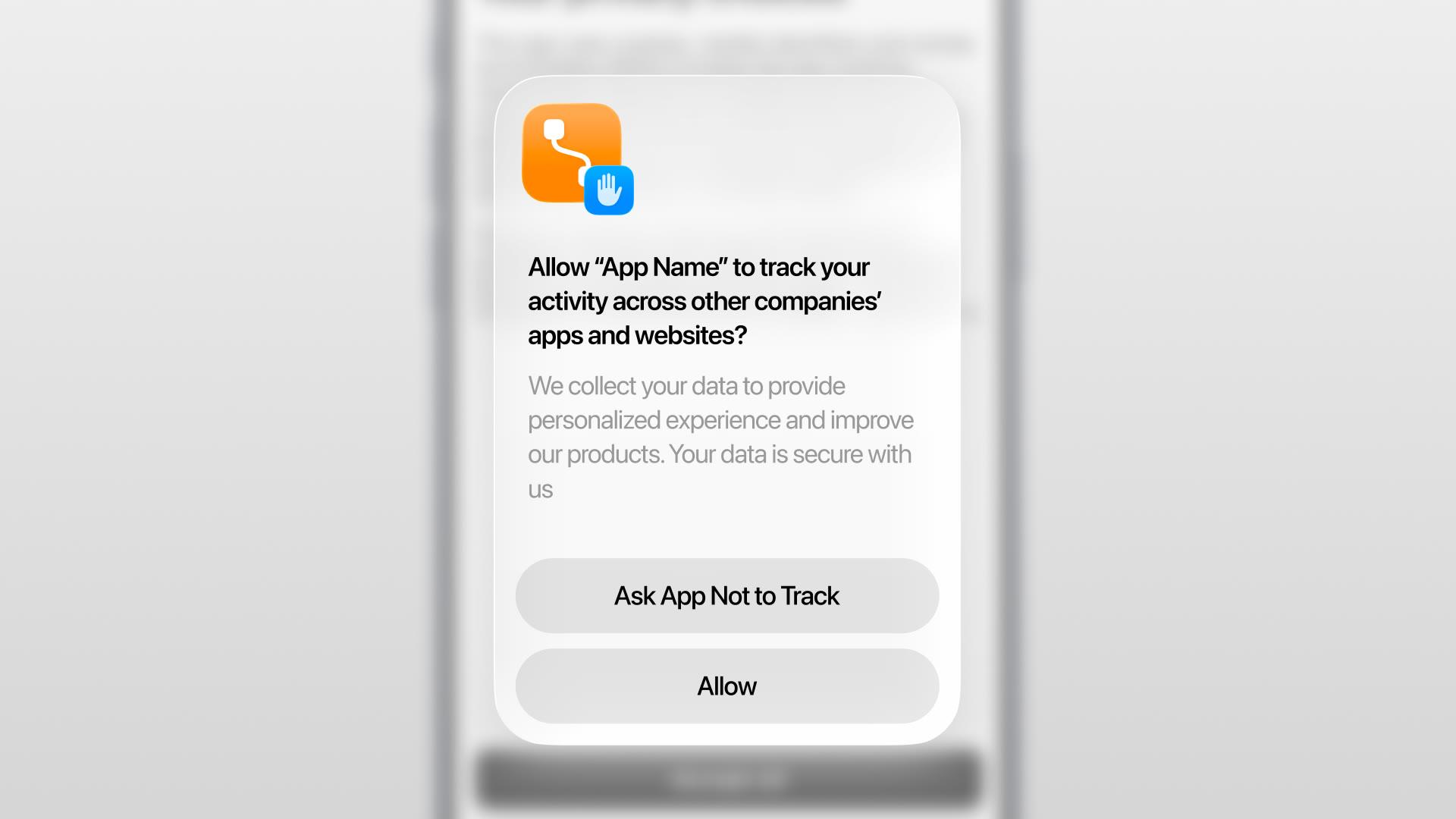

App Tracking Transparency (ATT) is Apple's rule that an app must get permission through a system prompt before tracking customers across other companies' apps and websites or sharing their data with data brokers. An e-commerce app needs the prompt only if it performs tracking as Apple defines it. This guide covers how to tell and how to ask.
ATT is a platform requirement, not a privacy law. It sits alongside your GDPR, e-privacy, and CCPA obligations rather than replacing them. For how those layers fit together, start with privacy and consent for e-commerce mobile apps.
Scope, and what this is not. This is a practical guide for product and marketing teams, not legal advice, and Apple's policies change. Whether your specific app performs tracking as Apple defines it depends on your real data flows, the SDKs and integrations you enable, and how you use them. Confirm the determination with your data map and counsel, and verify current Apple policy at the source before you rely on it.
What ATT is
ATT is a permission prompt, defined by Apple, that an app must show before it tracks a user for advertising or shares their data with a data broker. When an app wants to access the device's advertising identifier (the IDFA) or otherwise track the user across other companies' properties, iOS shows a standardized system dialog: "Allow [App] to track your activity across other companies' apps and websites?" with "Ask App Not to Track" and "Allow" options. If the customer declines, the app cannot use the IDFA and must not track them by other means.
Apple uses "tracking" more narrowly than everyday conversation does. The question is not whether the app collects any data. It is whether the app uses data in the ways Apple defines as tracking.
Does your e-commerce app even need ATT?
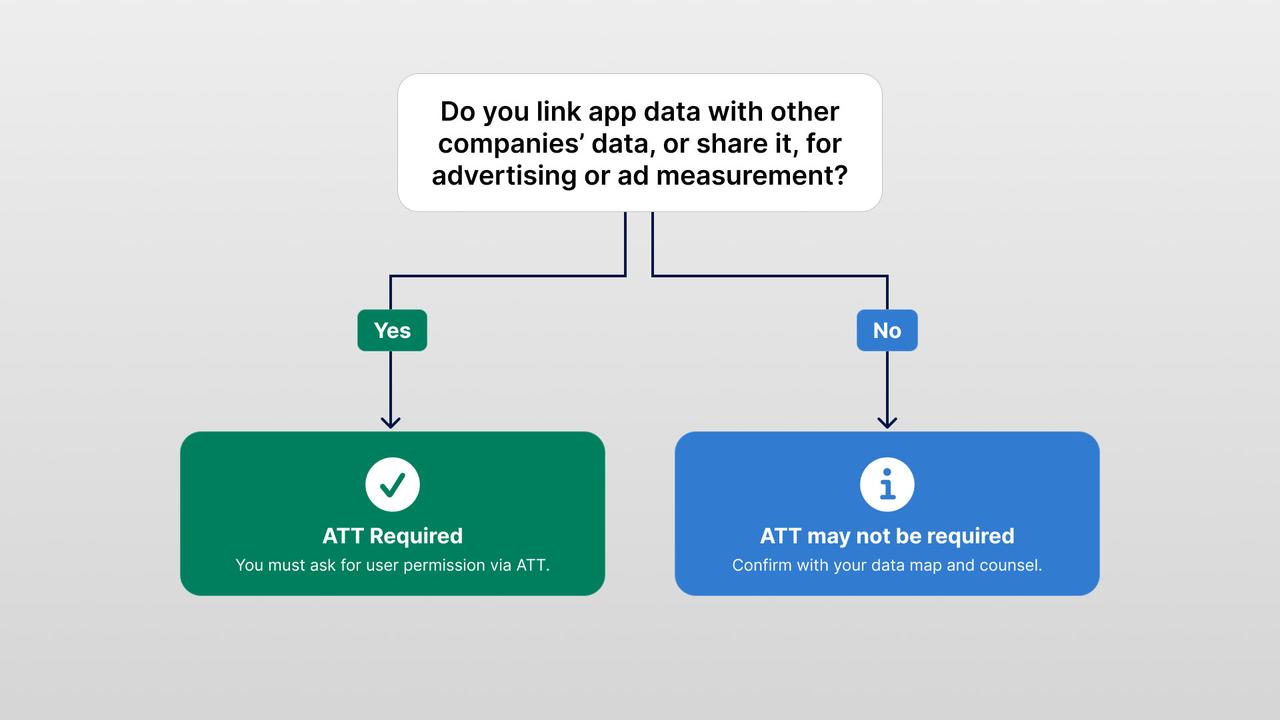
Your app needs ATT only if it performs tracking as Apple defines it: linking data collected in your app with data collected about that user or device by other companies, for targeted advertising or advertising measurement, or sharing user or device data with a data broker. Per Apple's user-privacy guidance, this applies even when the identifier is a hashed email address or phone number, not only the IDFA. Hashing does not take you out of scope.
That definition splits most real e-commerce setups cleanly. Here are Apple's own kinds of examples, mapped to a shopping app:
| Activity | Counts as tracking (per Apple)? | ATT prompt |
|---|---|---|
| Showing ads in your app targeted using data collected about the customer from other companies' apps and sites | Yes | Required |
| Sharing a customer email/phone list or advertising IDs with a third-party ad network so it can retarget those people elsewhere (even hashed) | Yes | Required |
| Embedding a third-party advertising or attribution SDK that combines your app data with other companies' data for ad targeting or measurement | Yes | Required |
| Sharing user or device data with a data broker | Yes | Required |
| First-party analytics about how people use your own app, not linked with other companies' data and not shared for cross-company advertising | No (per Apple) | Not required |
| Data linked only on the device, not sent off the device in a way that identifies the user | No (per Apple) | Not required |
| Sharing with a data broker solely for fraud prevention or security | Generally excepted | Confirm |
For most Shopify brands, ATT may not apply when measurement stays first-party and within the same brand. Cross-company retargeting, an ad-network SDK, or advertising list-sharing may bring the app into scope. An SDK's presence alone is not the test. Its actual data practices are. Make this call from your data map with counsel, not from a blog table. If an optional data use is unclear, map it before you build.
How to ask without coercion
If you do need ATT, ask in a sequence, not all at once. Apple lets you show a pre-prompt (a priming screen) before the system dialog, as long as it does not mislead. A good sequence has three steps:
- Context first. Let the customer use the app. Do not fire the prompt on the very first launch before they know what your brand is.
- A short pre-prompt that explains the benefit honestly and lets them proceed or not.
- The system ATT prompt, shown only after the pre-prompt, with a clear purpose string.
A pre-prompt that works:
Help us measure our advertising If you allow tracking, we can measure which ads bring customers to the app and make our advertising less repetitive. Your shopping experience works either way. Continue | Not now
The pre-prompt matters because the system generally presents the tracking request only once. After a customer answers the system dialog, the app cannot show it again. The customer usually has to change the answer in iOS Settings. An honest pre-prompt gives them the context they need before that decision.
The purpose string: say what the data does
The system prompt includes a purpose string you write, and it should describe the actual use, not a vague "for a better experience." This is the NSUserTrackingUsageDescription text. A generic or misleading string undermines a truthful disclosure and can create review risk, so describe what the data really does.
- Weak: "We use tracking to give you a better experience."
- Better: "We use your device identifier to measure advertising performance and personalize advertising across other companies' apps and websites."
Only use a string if it is true for your app. If you are not actually personalizing ads across other companies' properties, do not say you are. The purpose string is a factual disclosure, and it should match what your enabled integrations really do.
What you must not do
Apple is strict about coercion, and these are the mistakes that get apps rejected or pulled. Per the App Review Guidelines and Apple's privacy design guidance:
- Do not gate functionality. Shopping, browsing, content, offers, and rewards must all work whether or not the customer allows tracking. You cannot lock features behind "Allow."
- Do not offer incentives for granting permission. No discounts, points, or perks in exchange for allowing tracking.
- Do not manipulate the choice. No fake buttons, no pre-prompts designed to trick, no wording that implies the app breaks without tracking.
- Do not track before authorization. If the customer has not allowed it, do not collect the IDFA or track by hashed identifiers or any other route.
- Do not nag. The system generally shows the request once; after that, respect the answer and point to Settings if the customer wants to change it.
ATT permission must be a genuine, uncoerced choice. Treat it that way and you also avoid review problems.
After the prompt: respect the answer over time
Permission is not a one-time event. Check the tracking status on later launches and act on it. The status can be not determined, denied, restricted, or authorized, and a customer can switch it off later in Settings. If the status is anything other than authorized, stop tracking, including any hashed-identifier or SDK route, until it becomes authorized again.
In the privacy center, show the current tracking status and a clear route to change it. Because the OS owns this permission, the app cannot flip it from an in-app toggle; it can explain the setting and deep-link to iOS Settings. Never let an in-app switch pretend it changed Apple's system permission. That privacy-center pattern, and how it relates to your other consent controls, is covered in the cluster pillar.
If a customer declines, you do not lose all measurement
A decline does not mean you lose all measurement. Apple provides privacy-preserving attribution frameworks that work without tracking individuals, including AdAttributionKit and SKAdNetwork where applicable. Apple documents them as interoperable rather than one replacing the other, and now recommends AdAttributionKit for app-ad campaigns while still documenting SKAdNetwork. Both report campaign performance at an aggregate level, so you can still see which campaigns drive installs and conversions without identifying the person.
Aggregate attribution is useful, but it does not replace user-level data. Its usefulness depends on ad-network support, campaign and conversion-value setup, time windows, privacy thresholds that suppress low-volume results, and delayed aggregate postbacks. Plan for those limits rather than assuming equivalent reporting.
Two practical consequences for an e-commerce brand:
- Treat aggregate, privacy-preserving attribution as the baseline, and treat user-level data from customers who allowed tracking as an addition, not the foundation.
- Lean on first-party signals you already own. First-party commerce analysis can remain available without ATT when its implementation does not perform Apple-defined tracking and your other privacy obligations permit the processing. Be careful here: forwarding your own app events to an SDK that repurposes them for advertising can itself be tracking in Apple's terms, even if you never use that advertising capability. Kept genuinely first-party, in-app behavior and purchase history are often richer for a commerce app than cross-app ad data anyway. For what to actually measure, see mobile app metrics for Shopify brands.
An ATT allow does not make a data flow lawful under GDPR or e-privacy. An ATT denial also does not decide how you handle all first-party processing. ATT is one control among several. Ask honestly, accept the answer, and build measurement that works at both consent levels.
ATT is not GDPR or CCPA consent
Getting an "Allow" on the ATT prompt does not give you GDPR or e-privacy consent, and it does not satisfy California's opt-out rules. These are separate layers that have to line up:
- ATT is Apple's permission to track across other companies' properties.
- GDPR / e-privacy consent governs whether you may process and share the data in the first place, and it has its own requirements for how it is captured and withdrawn.
- CCPA/CPRA gives Californians the right to opt out of sale or sharing, and to have opt-out signals honored.
A customer could allow ATT while you still need a separate lawful basis under European rules, or while a Californian has opted out of sharing. Design the flows so they agree with each other rather than assuming one covers the others. The pillar guide walks through the full stack.
A build checklist
Before you ship the ATT flow, confirm all of this:
- Determination done. You know, from your data map and counsel, whether the app performs Apple-defined tracking at all.
- Prompt only if needed. If nothing in the app tracks across companies, you do not show the prompt.
- Pre-prompt, then system prompt, with context first and no coercion.
- An honest purpose string that matches what your enabled integrations do.
- No gating, no incentives, no manipulation.
- Status re-checked on launch, with tracking stopped whenever it is not authorized.
- A privacy-center entry showing status and deep-linking to Settings.
- Aggregate attribution and first-party analytics set up so measurement survives a decline.
- App Store privacy labels that reflect the tracking you actually do. Getting these right is part of a clean listing, see how to fill in your app store listing without getting rejected.
How NAPPS helps
NAPPS is a native mobile app builder for Shopify and Shopify Plus brands. It bases the tracking choice on an in-app privacy preferences page, not the ATT prompt alone. In practice, the app:
- shows a "Manage your privacy preferences" page during onboarding that details the subprocessors involved and separates data collection into strictly necessary, performance, and targeting & ad personalization categories;
- captures the customer's choices on that privacy page, with context, so the decision is informed rather than a bare system dialog;
- sends no personal data before the customer has authorized tracking;
- keeps personal information out of the data flow after a denial or a later change in iOS Settings, while strictly necessary and performance data continue so the app keeps working and you can still see how it performs;
- applies this consistently across the iOS versions and integrations it supports; and
- is tested against the App Store privacy labels and SDK privacy manifests the app has to declare.
An app that ignores a tracking choice risks App Store rejection. The integrations enabled may vary by brand, but the choice is always honored. NAPPS does not decide whether a data flow counts as tracking in your products and markets, or what your lawful basis is. Make that determination with counsel, then configure the app to match it.
For the wider picture of launching a Shopify app, see how to turn a Shopify store into a mobile app (2026).
Frequently asked questions
No. ATT is required only if the app performs tracking as Apple defines it: linking your app's data with other companies' data for targeted advertising or measurement, or sharing user/device data with a data broker. An app that only does first-party, same-brand analytics with no cross-company advertising may not need it. Confirm from your data map and legal review, since the determination depends on your actual data flows.
No. Apple's definition of tracking covers linking data across companies for advertising even when the identifier is a hashed email or phone number rather than the IDFA. Hashing does not remove the need for the prompt if you are doing cross-company tracking.
No. Apple prohibits gating app functionality on ATT and prohibits offering incentives in exchange for permission. Shopping, offers, and rewards must work whether the customer allows tracking or not.
You can still measure with Apple's privacy-preserving attribution frameworks, including AdAttributionKit and SKAdNetwork where applicable, which report campaign performance in aggregate without identifying individuals. It is coarser than user-level attribution and depends on ad-network support and setup, so treat it as the baseline, not a drop-in replacement. You also keep first-party, in-app analysis, provided its implementation does not itself perform Apple-defined tracking.
No. ATT is Apple's platform permission to track across other companies' properties. It does not give you consent under GDPR or e-privacy rules, and it does not satisfy California's opt-out requirements. Those are separate layers that each need to be handled.
Straight from the source
Apple changes these, so check the current versions:
- The User Privacy and Data Use page (Apple's definition of tracking, including the hashed-identifier point).
- The App Tracking Transparency framework documentation (permission behavior and status values).
- The App Store Review Guidelines (section 5.1.2, data use and sharing) and the Human Interface Guidelines on privacy.
- AdAttributionKit, SKAdNetwork, and their interoperability for privacy-preserving attribution.
The bottom line
First, decide whether your app tracks across other companies' properties for advertising. Many Shopify brands do not, so they should not show the prompt. If the app does track, use an honest pre-prompt and a truthful purpose string. Never gate or incentivise the decision, keep respecting it over time, and use aggregate attribution and first-party data to measure campaigns after a decline. An "Allow" is not GDPR or CCPA consent. Those layers still need their own controls.
If you are planning a Shopify app and want the ATT flow, the purpose string, and privacy-preserving measurement handled as standard behavior, book a 20-minute call with the NAPPS team and we'll show you how it comes together in a native app before you build.
Keep reading
October 27, 2026 - 10 min read
4 MobiLoud alternatives for Shopify: pricing and fit


October 23, 2026 - 8 min read
Tapcart vs Shopney: pricing, features, and which fits your Shopify store
September 18, 2026 - 13 min read
Tapcart Alternative: NAPPS Pricing, Features & Migration