

Friday, September 11th 2026
Klaviyo push notifications for Shopify mobile apps
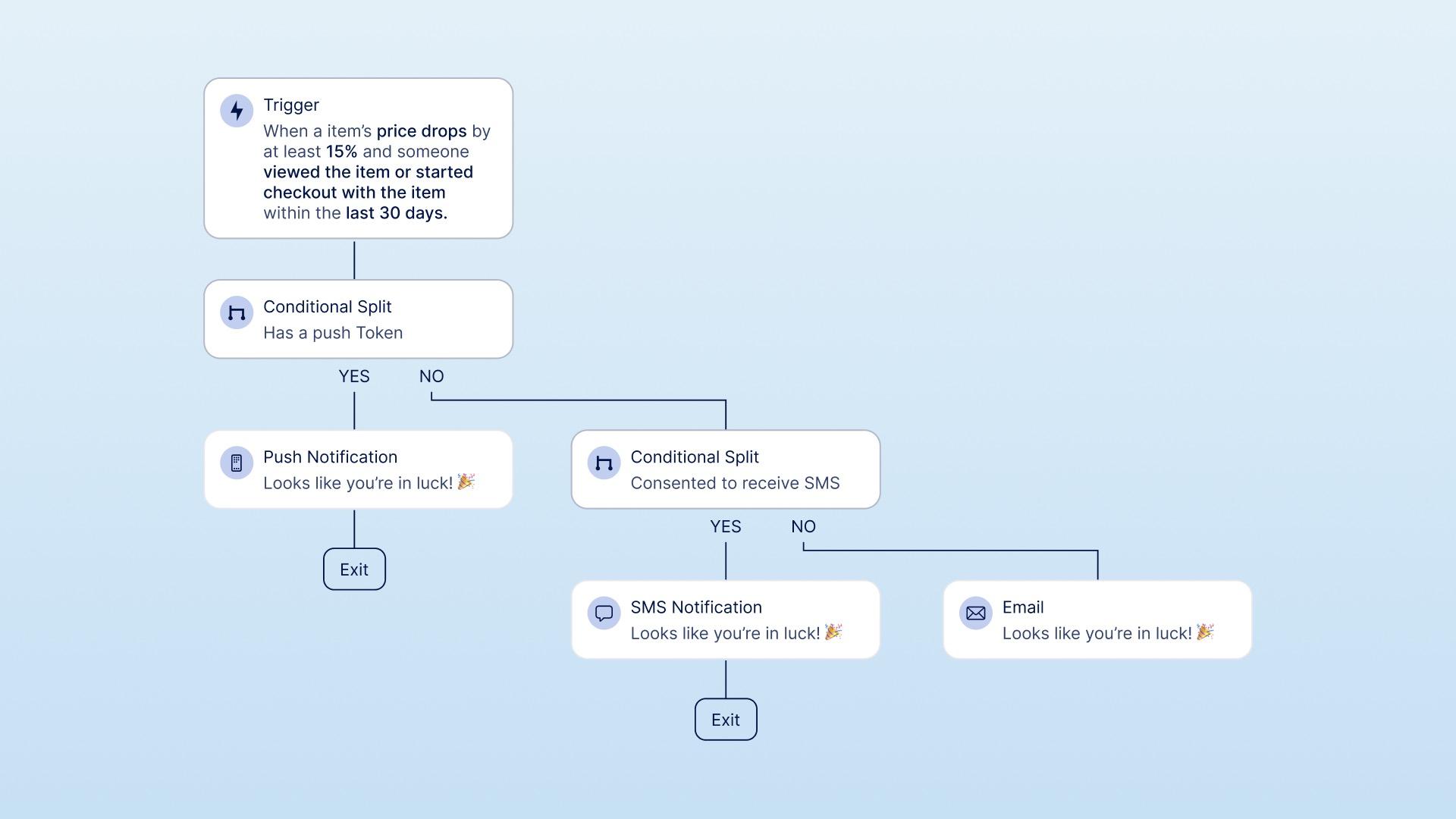

To run Klaviyo push notifications in a Shopify mobile app, connect the app to the Klaviyo profiles you already use, so in-app behavior feeds the same segments and flows as email and SMS. Plan three things before you send: the event taxonomy, the flow logic, and consent. Push, email, SMS, and OS permission are separate consent states.
Do not treat the app as another broadcast channel. Push, email, and SMS each have a different job. The app adds behavioral signals, such as what customers browse, save, and buy, plus new places to reach them.
This guide covers how to plan Klaviyo push in a Shopify mobile app. It is not a setup manual. Use Klaviyo's official implementation instructions for the SDK and platform configuration.
Prerequisites before you plan Klaviyo push notifications
You need a Shopify or Shopify Plus app, a Klaviyo integration on any NAPPS plan, and a clear owner for campaign logic. You also need to decide which pre-purchase events the app will send, where each push will land, and how customers can manage their notification preferences.
NAPPS supports Klaviyo on every plan for push, email, and SMS orchestration with shared segments, and it ships profile identification, event tracking, in-app forms, and deep links from a Klaviyo message. It does not support geofencing. Scope the work against that list rather than against Klaviyo's full mobile SDK, which documents capabilities an app platform may or may not have built.
The division of labor is:
| What Klaviyo does | What the app must do | What Shopify owns |
|---|---|---|
| Stores profiles, runs segments and flows, sends push, email, and SMS, and reports message attribution from synced order data | Identify the user, send well-formed app events, ask for push permission in context, resolve deep links, and host the preference center Klaviyo does not provide | The order ledger: completed orders, revenue, AOV, and repeat purchase, via its own Placed Order events |
If a number or decision does not fit one of those columns, the setup is probably unclear.
The opportunity: extend the customer record, not the send volume
Klaviyo is a customer database before it is a sending tool. Email, SMS, and push use the same profiles, events, and segments. A mobile app connects in two directions:
- Inbound: the app writes pre-purchase intent events onto the Klaviyo profile (product viewed, searched, added to cart, checkout started, push opened), so your segments and flows can use in-app behavior alongside the email opens and the Shopify order events they already use. Completed orders stay with Shopify's order events, not a duplicate app event: more on that below.
- Outbound: Klaviyo can reach the customer through the app, with push and in-app messages, and send them to a specific in-app destination rather than a generic home screen.
The goal is one lifecycle with a native surface, not a parallel program. For each customer and moment, choose the channel and destination that helps. See the push notifications retention guide for coordination across channels.
What Klaviyo's mobile SDK can enable
Klaviyo documents mobile SDKs for iOS, Android, React Native, and Flutter, and groups their capabilities into five areas (Klaviyo SDK overview):
| Capability | What it gives a Shopify brand |
|---|---|
| Profile identification | Recognize an app user as an existing Klaviyo profile, so app activity joins their lifecycle history |
| Event tracking | Record in-app behavior and conversions as Klaviyo events for segments and flows |
| Push notifications | Send targeted, personalized mobile push from Klaviyo campaigns and flows |
| In-app forms | Show announcement-style in-app messages to active users, including those who never enabled push |
| Geofencing | Trigger or measure behavior around a physical location (optional, advanced) |
Klaviyo's SDK documentation describes these capabilities, and a NAPPS app ships every one of them except geofencing. The sections below cover the decisions each one still needs from you: the identity you write, the event taxonomy you agree, and where each message lands.
Identity: connect app activity to the profile you already have
Everything useful downstream depends on Klaviyo knowing whose behavior it is watching. When a customer logs in or creates an account, the app identifies them as a Klaviyo profile, and their app events attach to the same record that holds their email history and Shopify orders. Before that, some browsing may be anonymous, and how those early events resolve to a profile later is a detail worth getting right.
The practical rules to design around:
- Known vs anonymous. Decide what the app does before login. Guest browsing is fine and often better for conversion, but be clear about which events are captured anonymously and how they reconcile to a profile once the customer identifies.
- Logout and shared devices. Logout should stop associating new activity with the previous profile, so a shared tablet does not blend two customers.
- One person, several devices and tokens. A single customer can hold multiple push tokens across devices, so identity is person-level while push reachability is device-level. Keep that distinction in mind whenever you count "reachable" audience.
The event foundation: the signal that makes everything else work
Push and in-app messages depend on good events. The goal is not more sends. It is a relevant send based on what the customer just did.
For a commerce app, the events worth capturing map to pre-purchase shopping intent:
- Product viewed (with product, collection, price, availability)
- Search performed (with the query, and whether it returned results)
- Added to cart (with product, quantity, value)
- Checkout started (with cart value)
- Push opened (with the campaign and, where used, the action-button details)
Notice what is not on that list: a completed purchase. That omission is deliberate, and it is the single most important data-integrity decision in this whole integration.
Do not send a second "purchased" event from the app
If your store uses Klaviyo's Shopify integration, Klaviyo already receives Placed Order and related order events directly from Shopify (Klaviyo's Shopify data reference). If the app then fires its own "Purchased" event for the same order, you can double-trigger flows, inflate revenue, and corrupt segmentation, because one real order now looks like two. So the rule is:
- Completed orders: use Shopify's order events (
Placed Orderand friends) as the single source. Do not emit a duplicate app purchase event. - Pre-purchase intent: use app events (viewed, searched, added to cart, checkout started) for everything leading up to the order.
- If you genuinely need an app signal at the moment of purchase (for example, to know the order originated in the app), send a clearly distinct, deliberately named checkout-handoff or app-order-context event, and make sure no flow treats it as a second order. Deduplicate against the Shopify order before it can trigger revenue or order-count logic.
The first property rule matters just as much: an event is only as actionable as its attributes. "Product viewed" is weak, but "viewed a product in Collection X, in stock, over 50 euros" is a segment.
Getting this taxonomy right is the same activation and behavioral-signal work that underpins app growth generally, which we cover in the app growth guide.
Klaviyo push notifications that land somewhere useful
Push is often the first capability brands reach for and the easiest to misuse. A daily generic broadcast trains customers to turn it off. Klaviyo's product rules shape how to use it.
Push consent is its own decision, and its own token
Klaviyo states that explicit mobile-push consent creates a device-specific push token on the profile. A person can hold multiple tokens across multiple devices, and consent for email or SMS does not by itself grant consent for push (Klaviyo push-consent guidance, consent in profiles). Two consequences follow. First, ask for push permission in context, after the app has shown value, not on cold first launch. Second, treat push permission, marketing consent, and topic or category preferences as three separate choices a customer makes, not one bundled opt-in.
Klaviyo also notes that it does not provide a push preference center, so the customer-facing control over what push a person receives is something the app team builds. That belongs in your app's own preference or privacy center. Treat it as an app-side design requirement rather than legal advice: where and how a customer changes push preferences is a privacy-center design question, and the deeper consent distinctions belong to the privacy cluster, not this article.
Without a deep link, a push opens the home screen
Klaviyo is explicit that without a deep link, a push notification opens the app's home screen, leaving the customer to find the thing you promised (Klaviyo introduction to mobile push). For a commerce brand that is a direct conversion leak: a "back in stock" push that dumps the customer on the home feed wastes the intent it just created. So every campaign brief should name a destination and the success event, not just a message.
Action buttons make that destination measurable. Klaviyo's action buttons support Open App, Deep Link, and website actions, and the resulting Opened Push event carries the button label, button action, and, where relevant, the button link, which you can then use in reports and segments (Klaviyo action buttons for push). A descriptive button such as "View the collection" makes the next step and the reporting dimension clear. Test it against a generic "Shop now" button on your own audience.
A push open is not an email open
Klaviyo's push reporting distinguishes received, opened, and bounced events, and a push open is a tap that opens the app (Klaviyo push metrics reference, Klaviyo push-delivery guidance). Do not compare a push-open rate directly with an email-open rate: they are different actions measured different ways, and delivery itself is provider- and platform-specific across iOS (APNs) and Android (FCM). Judge push against push, and against the downstream commerce outcome, not against your email dashboard. The full strategy sits in the complete guide to push notifications for Shopify.
A worked campaign: back-in-stock Klaviyo push notifications
One campaign brief should answer more than "what copy will we send?" Consider a customer who viewed an out-of-stock product and has granted push permission.
| Campaign element | Decision |
|---|---|
| Audience | Customers who viewed the product, have an eligible push token, and have not purchased it since the view |
| Trigger | The product returns to stock |
| Consent eligibility | Push permission is active. Do not treat email or SMS consent as push consent |
| Destination | A deep link to that product, with a tested fallback if the product is no longer available |
| Suppression | Exclude recent purchasers and anyone who already received the same back-in-stock message |
| Success event | Product view, add to cart, checkout start, or order after the send, defined before launch |
| Reporting owner | CRM owns the Klaviyo send report. Ecommerce owns Shopify order reporting. The app owner checks deep-link arrival and the 12-hour NAPPS push-attribution report where applicable |
The NAPPS dashboard reports sessions, add-to-carts, cart views, checkouts, orders, and sales from push recipients within 12 hours of a send, plus revenue per recipient. Do not add that figure to Klaviyo, email, SMS, or paid-media attributed revenue. Those systems can credit the same order under different rules.
In-app messages: the surface after the open
In-app forms are messages Klaviyo shows inside the app. They can target specific users or segments and can be triggered by an app open, a push open, or a tracked event (understanding in-app forms, creating an in-app form). They complement push rather than duplicating it: push earns the app open, and an in-app message continues the journey once the customer is inside.
Good uses for a commerce brand:
- A new-drop or collection announcement when an engaged customer opens the app
- A back-in-stock or price-drop prompt tied to something the customer viewed
- An app-only offer that rewards using the app
- A follow-up surface right after a push open, reinforcing the same message
One firm limit: Klaviyo's in-app forms are announcement and engagement surfaces, and the current product does not support using them to collect consent or profile data. So do not design an in-app form as a privacy-consent mechanism or a data-capture form. Consent and preference collection belong in purpose-built app screens, which is a privacy-cluster topic, not an in-app-message one.
Coordinate across channels: Smart Sending is per channel, not cross-channel
This is the caveat most brands miss, and it undoes the "one lifecycle" promise if you assume the platform handles it for you. Klaviyo's Smart Sending prevents a profile from receiving too many messages in a set window, but it operates per channel, not across channels (Klaviyo's Smart Sending guidance). A customer who just got an email can still receive an SMS and a push within their respective Smart Sending windows, because each channel enforces its own limit independently.
So adding a push channel does not automatically make your messaging coordinated. Real coordination is deliberate work:
- Exclusions: exclude recipients of one channel's message from a near-simultaneous send on another.
- Sequencing: decide the order (for example, push first, email as a follow-up) rather than firing all channels at once.
- Follow-up logic: trigger the next channel based on whether the previous one was opened or acted on, not on a fixed clock.
Turning on Smart Sending is necessary but not sufficient. The cross-channel discipline, deciding which single message actually helps this customer right now, is the harder part. Read how to coordinate push, email, and SMS before adding a new campaign.
A reporting model: keep every metric in its source of truth
The fastest way to lose trust in the program is to force every number into one dashboard. Klaviyo, Shopify, your app analytics, and the store consoles each own different truths. Shopify is the financial and operational order ledger, but Klaviyo is the right place to assess Klaviyo message attribution from its synced order data. They answer different questions. The Shopify mobile app metrics guide explains the wider measurement model. Here is the Klaviyo-specific split:
| Metric | Where it lives (source of truth) | Definition note |
|---|---|---|
| Reachable push audience | Klaviyo | Eligible push tokens or profiles at send time, not all installs. A token can be stale or invalidated, so a token count is neither installs nor people; it is device-level. |
| Delivery rate | Klaviyo (via APNs/FCM) | Provider- and platform-specific; do not compare iOS and Android delivery as identical. |
| Push-open rate | Klaviyo | Taps that open the app; not comparable to email opens. |
| Klaviyo message attribution (per channel) | Klaviyo | Klaviyo credits orders to its messages using a last-touch model with channel-specific windows; read it as Klaviyo's view, defined by those windows. |
| Deep-link arrival / destination | App analytics (+ Klaviyo action-button data) | Did the tap land on the intended screen, or fall back to home? |
| Add-to-cart and checkout-start rate | App analytics | In-app intent events after the send. |
| Order revenue and order count | Shopify | The financial and operational ledger for physical-goods orders. |
| Repeat-order contribution | Shopify (customer-level) | Whether app-reached customers buy again, through any channel or the app specifically. |
Two rules keep this honest. First, define whether "repeat" means any-channel or app-only before you report it, because those answer different questions. Second, do not sum revenue from different attribution systems without documenting their windows and model. The same order can be credited by several systems at once, so adding, say, Klaviyo's attributed revenue to a paid-media platform's attributed revenue double-counts. And even within Klaviyo the channels are not simply three overlapping totals to add up, because Klaviyo uses a last-touch approach with channel-specific windows (Klaviyo's conversion-tracking documentation). Pick one model, state its window, or report each system's claim separately and clearly labeled.
Implementation checklist
A workable order of operations, each step with an owner:
- Identity: define login, account creation, logout, and anonymous-to-known reconciliation.
- Events: agree the event taxonomy and properties for pre-purchase intent, and confirm Shopify owns completed orders with no duplicate app purchase event.
- Deep links: map your highest-traffic product, collection, offer, and account destinations, and set fallback behavior.
- Push configuration: iOS and Android setup, token lifecycle, action buttons, and category preferences.
- In-app messages: triggers and targeting for app open, push open, and event-based messages.
- Consent: push permission asked in context; push, marketing, and category preferences kept separate; an app-side preference center built (Klaviyo does not provide one).
- Testing: verify events fire, deep links resolve to the right screen, and pushes render on both platforms.
- Reporting: wire each metric to its source of truth per the table above before launch, so day-one numbers are trustworthy.
Geofencing is not available on NAPPS
Klaviyo's geofencing retrieves nearby geofences after an app user opens the app, monitors entry and exit, and creates corresponding events for flows, segments, and reporting. It requires a mobile app, current SDK support, and location sharing (Klaviyo geofencing guide).
NAPPS does not support geofencing (verified 2026-09-08), so this is the one capability on Klaviyo's mobile list you cannot plan for in a NAPPS app. It would also add a location-permission flow and privacy and regional-law obligations, which is why it is rarely the reason a brand chooses an app in the first place.
What NAPPS supports today
NAPPS is a native mobile app builder for Shopify and Shopify Plus brands. Klaviyo is available on every plan for push, email, and SMS orchestration with shared segments. Your team owns campaign strategy, consent decisions, and any legal review.
Profile identification, event tracking, in-app forms, and deep links from a Klaviyo message are shipped. Geofencing is not supported. Keep Shopify as the ledger for orders and revenue. Keep Klaviyo's message attribution separate from the app's 12-hour push report.
Frequently asked questions
No. The NAPPS integration supports shared segments and orchestration across push, email, and SMS on every plan. Each channel still needs its own consent, frequency rules, and job in the customer journey.
No. Klaviyo treats mobile-push consent as its own device-specific decision that creates a push token on the profile, and email or SMS consent does not grant push consent. Ask for push permission in context, and keep push, marketing, and topic preferences as separate choices.
Because it has no deep link. Klaviyo notes that without a deep link a push opens the home screen, so every campaign should specify a destination. Action buttons like "View the collection" both send the customer to the right screen and make the destination measurable.
Not directly. A push open is a tap that opens the app, measured differently from an email open, and delivery differs across iOS and Android. Judge push against push and against the downstream commerce outcome, not against your email dashboard.
Klaviyo says its in-app forms do not currently collect consent or profile data. Do not design them as a consent or sign-up mechanism. NAPPS ships in-app forms, so the constraint here is Klaviyo's, not the app platform's.
No, not if your store uses Klaviyo's Shopify integration, which already sends Placed Order and related order events from Shopify. A second app purchase event for the same order can double-trigger flows, inflate revenue, and corrupt segmentation. Use Shopify's order events for completed orders and app events only for pre-purchase intent. If you truly need an app-origin signal at purchase, use a clearly distinct, deduplicated checkout-handoff event that no flow treats as a second order.
Not by itself. Klaviyo's Smart Sending works per channel, not across channels, so a customer can still receive an email, an SMS, and a push in the same window. Real coordination needs deliberate exclusions, sequencing, or follow-up logic across channels, not just Smart Sending switched on.
In Shopify. Physical-goods orders check out through Shopify, so it stays the financial and operational ledger for orders, revenue, AOV, and repeat purchase. Klaviyo is still the right place to read Klaviyo's own message attribution from its synced order data. Your app analytics own in-app intent, and the store consoles own discovery. Keep each metric in its own source of truth, and do not sum revenue across attribution systems without documenting their windows and model.
Run your Klaviyo program inside a native app
A NAPPS app is available with Klaviyo on every plan, and it ships profile identification, event tracking, in-app forms, and deep links, so your existing flows can reach customers on a native surface.
Book a 20-minute callKeep reading
October 27, 2026 - 10 min read
4 MobiLoud alternatives for Shopify: pricing and fit


October 23, 2026 - 8 min read
Tapcart vs Shopney: pricing, features, and which fits your Shopify store
September 18, 2026 - 13 min read
Tapcart Alternative: NAPPS Pricing, Features & Migration